The post How to Create your First Product Listing on Amazon? [STEP-BY-STEP] appeared first on Amazon-ASIN Blogs - Latest from Amazon Sellers: News, Advice, and Effective Strategies.
]]>Creating the perfect product listing is the essential part of success on Amazon. But if you’re a beginner, you may find it a bit challenging. Don’t worry; creating your very first product listing is much easier than you think, and we’ll discuss everything you need to know in this article.
You need to prepare a few things ahead of creating a product listing. Make sure that you have all the required information. I’m going to take you through three critical things.
- Product ID
- Keywords for your Listings
- Product Images
Product ID
If you’re selling a product that’s never been sold before on Amazon, then you need something called product ID. It’s a unique identifier for commercial products. UPC barcodes, EAN are all variations of Global Trade Item Numbers or GTINs.
Many websites sell GTINs for a low price. But, these are not allowed by Amazon. If you do buy it from these sites, there is a risk that your products might get suspended because Amazon might think your products are fraudulent. Amazon suggests a GS1 platform to buy UPCs from, or you can also buy it from legitimate GS1 sellers.
Keywords for your Product Listing
Keywords are one of the important factor that increases your chances of being visible to your potential customers.
Researching keywords can be a bit of a pain. So this is where we come in. With SellerApp’s powerful tools, you can research the right sort of keywords for your product listing based on CPC, search volume, relevancy, etc.
We’ve already created a detailed video on how to research keywords for your listings on Amazon using SellerApp:
You need a unique set of keywords for product title, bullet points, description, and backend search terms.
Product Images
Make sure you have the right set of images for your product. Images can influence the buying decision of shoppers to a large extent.
So you need to make sure that you have the right images that put your product in the best light possible.
- Ensure the images are of High-quality
- Capture product in Different angles
- Portray lifestyle images in different use case scenarios
- Highlight all the USPs.
- Use Infographics to show how your product is unique from your competitors.
How to Create Product Listing on Amazon?
Now you have everything you need, let’s have a look at how to create a product listing on Amazon
- Sign in to Amazon Seller Central
- Add a New Product or Select Existing Product
- Select your product listing Category & Sub-Categories
- Filling out Product Listing Information (Vital-Info)
- Product Listing Information (Variations)
- Select your Fulfillment Channel
- Upload Product Images
- Add Product Description
- Add Keywords
Step 1: Sign in to Amazon Seller Central
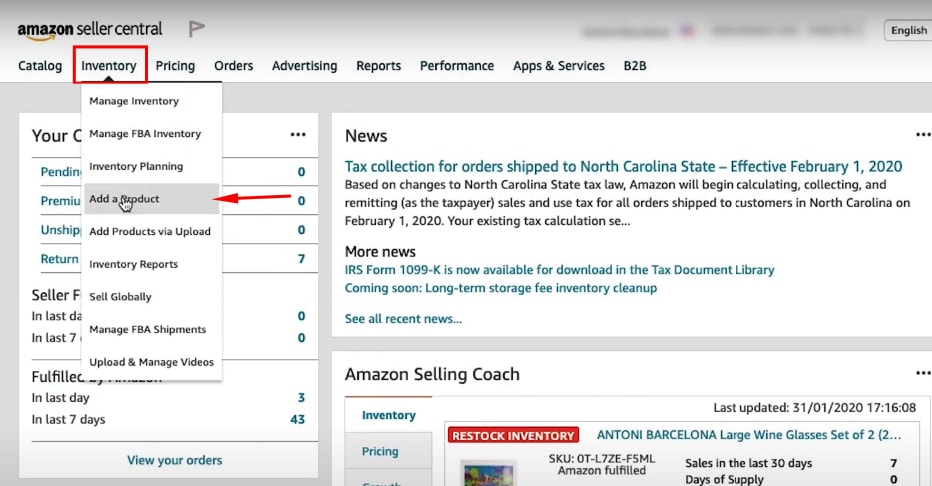
Sign in to Amazon Seller Central and select Add a product under the inventory drop-down menu.
Step 2: Add a new product or Select a product that’s already on Amazon.
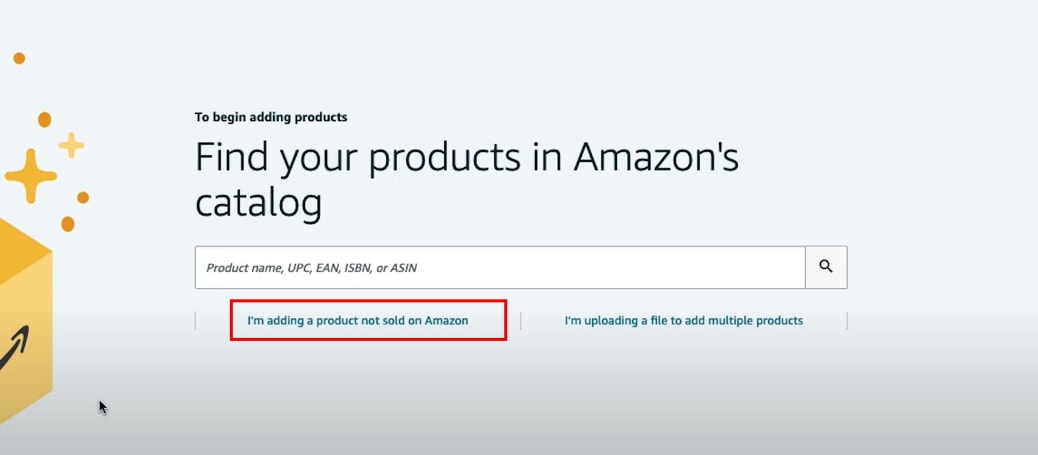
Here you see two different options. The first one is if you’re planning to sell a product that already exists on Amazon, then you can choose the first option, which is to find your products in Amazon’s catalog.
If you have any Product ID like EPC or ISBN, or ASIN number, you can type it in the search box.
If you are planning to sell a product that’s not sold on Amazon then click on ‘I’m adding a product not sold on Amazon’
Step 3: Select your Product listing Category and Sub-categories
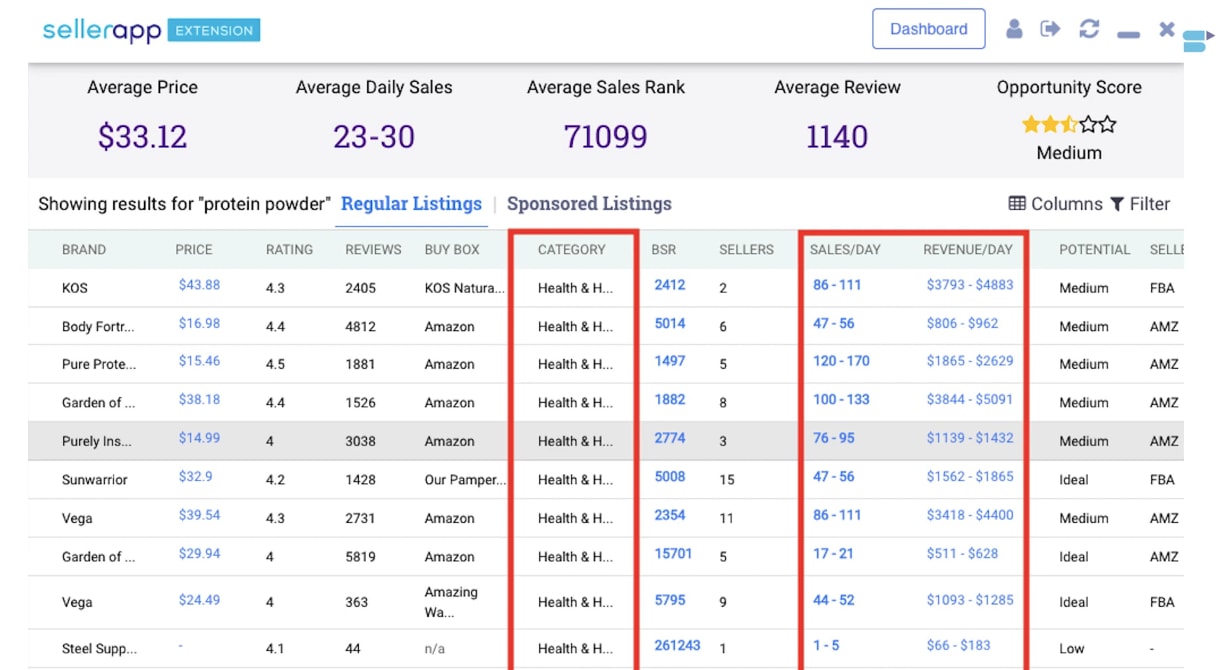
Once you click on the second option, you’ll be taken to a page with categories to choose from. if you feel like your category might qualify for two different categories, then the wisest thing to do would be to look at where the existing sellers are listed and look at their corresponding daily sales and revenue whatever category is making the most amount of sales, I would say choose that specific category.
You can use the SellerApp Chrome extension to find out the daily amount of product sales and revenue per seller.
For Example:
I have already chosen the product, which is ‘whey protein powder.’
and it’s the best seller in its niche.
Let’s figure out what category it’s listed under.
Health and Household > Sports & Nutrition > Protein Powders > Whey
Step 4: Filling out your product listing Information (Vital Info)
Once you’ve selected the correct category, you’ll be taken to the most essential part of the process, which is filling out the listing information of your new product.
This section is divided into different tabs, and the first one is vital info.
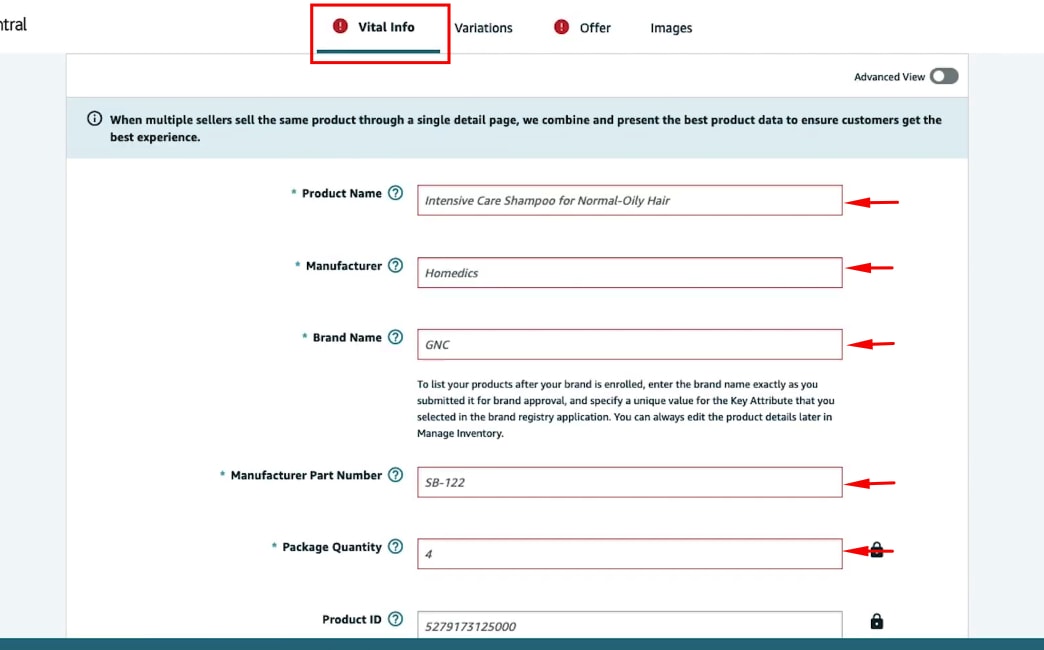
The Vital tab contains one of the essential parts of your product listing. which is your product name, manufacturer, brand name, manufactures part number, package quantity, product id, and more.
Step 5 – Filling out your listing Information (Variations)
If you have different variations for the same product that you’re selling. based on size or color or items, then you can choose variations. You can create a parent ASIN and then list all the child ASINs under it.
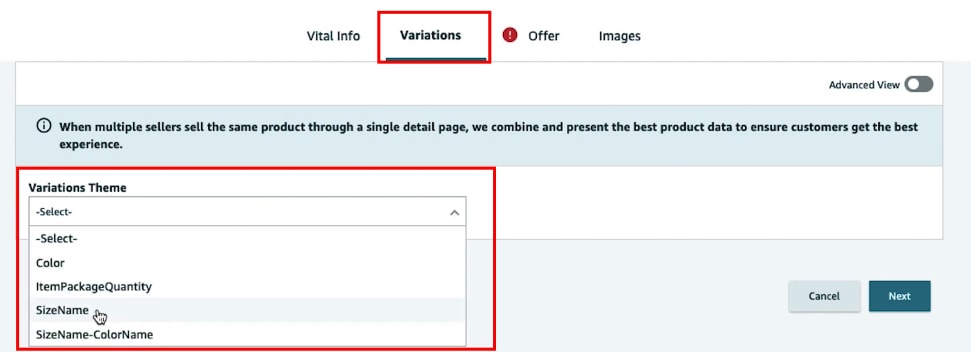
Step 6 – Select Your Fulfillment Channel
There are two options in the fulfillment channel: the first one is motion fulfills, and Amazon fulfills the second one. If the seller is fulfilling the orders, package everything, then it is merchant fulfilled.
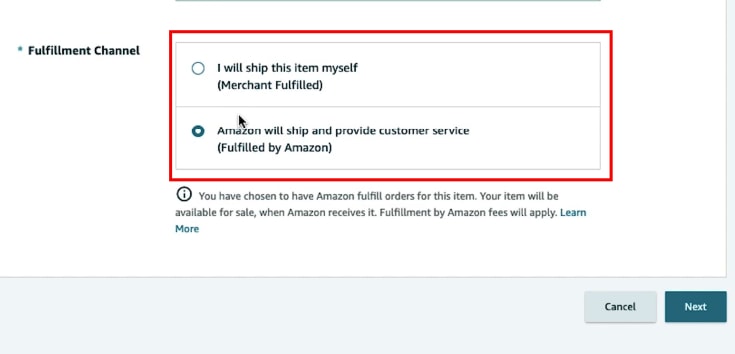
If Amazon is taking care of packaging, shipping, customer service, everything, then it is fulfilled by Amazon.
Step 7 – Upload your Product Images
Move on to the image section. This is where you can upload all of your images. It is recommended to have at least five to six images, and Amazon allows up to ten images. it would help if you made sure that images are of excellent high quality and high resolution.
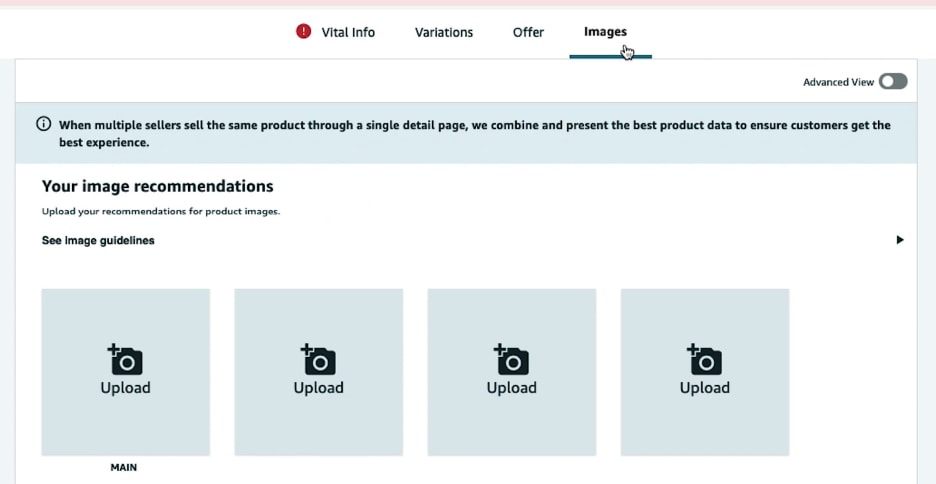
You can have one product image as a thumbnail image, and the rest can be product detail images, infographics, and lifestyle images.
Best Practice
- Images should be at least 1000px on the longes side & 500px on the shorter side
- Ensure your product occupies 85% of the space on the image.
- Don’t add any watermarks or logos on the product images
Once you uploaded all the images, click on advanced view. It will show you multiple different options that were hidden.
Step 8 – Add Product Description
The description is super important as you will be entering your bullet points and product description.
- You’re allowed to have five bullet points to maximize your visibility
- Add your keywords in the description
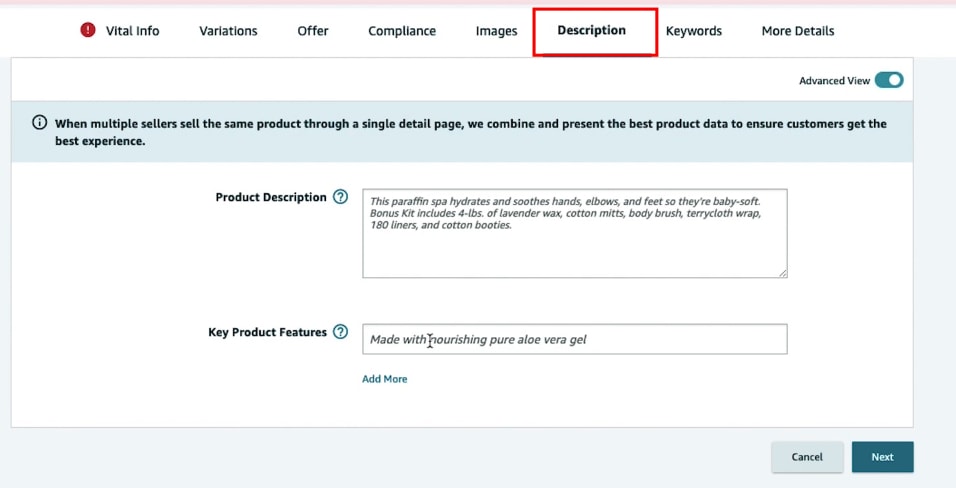
Create an attractive HTML product description for your Amazon product for free with the Amazon Product description editor. No HTML knowledge is needed!
Step 9 – Add Keywords
Keywords are another critical part of creating a successful product listing. Tools like SellerApp can help you find the perfect keywords for your product.
The first one is search terms which are usually referred to as backend keywords. If you have any synonyms or any other keywords that you’d like to put into your listing, you can add those search terms here.
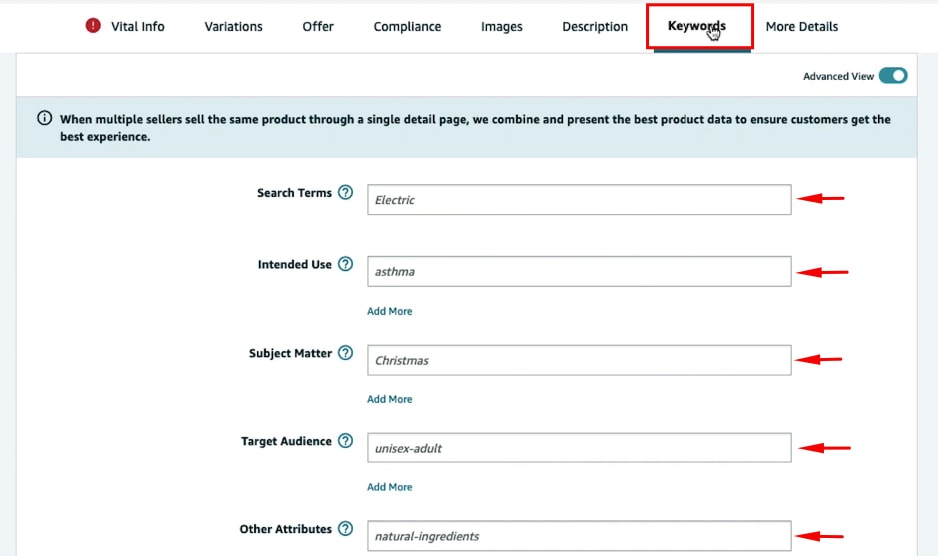
That’s it click Save and finish, and you have created your product listing.
Amazon product listing Restrictions
Now that you’ve created your very first Product listing, make sure you avoid the following
- Don’t use terms like best, free, buy one get one or subjective terms like cute, cool, etc.,
- Stay away from trademark words & Amazon words like special amazon deals.
- Don’t do keyword stuffing because neither amazon, not the shoppers like it
- Incomplete listing will be suppressed, fill out all the information required.
- Don’t use time-sensitive information, like the best product of the year.
- Don’t put shipping details on the description, like free shipping or the shipping duration.
Final Words
Let’s summarize you need to have the following information ahead of creating a product listing on Amazon, like your product ID, keywords, and images. Then you will sign in to your seller central account, choose to add a product on the inventory drop-down menu in the seller central, select the option to add a product that’s not sold on Amazon before, and fill out all your product details and select the appropriate category & subcategories.
You can choose an FBA offer if you want Amazon to fulfill your orders. I hope you found this article helpful.
The post How to Create your First Product Listing on Amazon? [STEP-BY-STEP] appeared first on Amazon-ASIN Blogs - Latest from Amazon Sellers: News, Advice, and Effective Strategies.
]]>The post E-commerce Keyword Research: A Beginners Guide appeared first on Amazon-ASIN Blogs - Latest from Amazon Sellers: News, Advice, and Effective Strategies.
]]>Let us quickly examine some fascinating stats.
- 37.5 percent of traffic to e-commerce websites comes from search engines (SEMrush).
- 23.6 percent of e-commerce orders are directly connected to organic visitors (Company Insider).
Let us dip into the technical approaches in the modern guide.
Importance of Keyword Research
A keyword analysis is the foundation of every e-commerce SEO campaign. Because keyword research informs each other SEO-related activity, you do on your site. Without keywords, it’s not possible to optimize your website.
List of keywords influences your technical SEO too. That is because your site architecture and URLs will need to take keywords into consideration.
Since you can observe, keyword research is a VERY major deal for your eCommerce site.
And here’s exactly how to locate untapped keyword search terms that your customers search for… and also how to choose the best keywords for your website.
Best ways to find keywords for Product and Category Pages
Most keyword research tutorials give attention to “informational keywords”.
Informational keywords are type of search terms that people type into search engines to detect helpful “howto” content.
(Like “How to make coffee beans into powder”)
While informational keywords have their place within e-commerce, the vast majority of your website’s keywords will be customized around product searches.
(Like “Coffee Beans”)
Meaning you will need to tackle keyword search together with product-focused keyword phrases in mind.
Here’s precisely how to take action:
1. Amazon
Yes, Amazon might be your competitor. Nonetheless, it is also the most excellent e-commerce site on the web… helping to make it a items’s keyword gold mine.
Here is the Way to tap into Amazon for keyword study:
First, go over to Amazon and input a keyword that explains one’s merchandise.
Whenever you’re doing this, Amazon will list hints on this keyword.
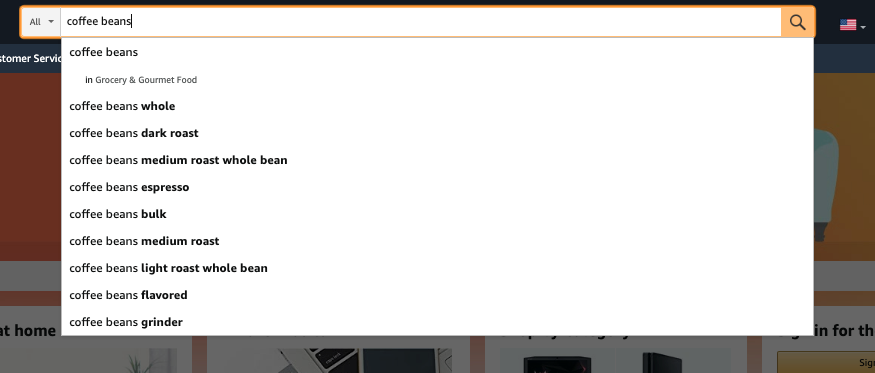
The keywords Amazon suggests are normally quite targeted (also referred to for so long-tail keywords ). Not just do long-tail keywords tend to convert a lot better compared to briefer terms. However, they are usually less competitive too.
Rinse and repeat your primary services and products on your website.
Pro Suggestion: Amazon will sometimes indicate categories over the keyword suggestions. All these create great search phrases to utilize for pages.
2. Wikipedia
Wikipedia is amongst the best regions to find keywords for the category and product pages.
That is why, Much like with category pages on your eCommerce competitor sites, Wikipedia organizes things by keywords and categories. Entirely only: they’ve done the work for you!
Let’s look at an example of ways to use Wikipedia for e-commerce research.
Firstly, Enter a keyword that describes a product or category your site sells:
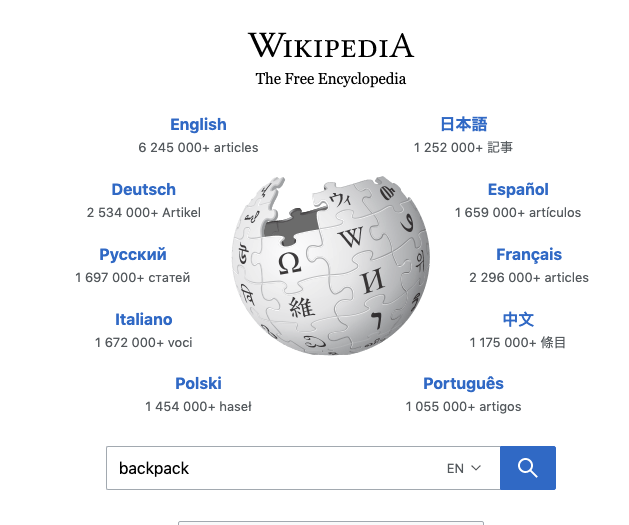
Then scan the Wikipedia entry to phrases and words that make feel for the products you have on your website:
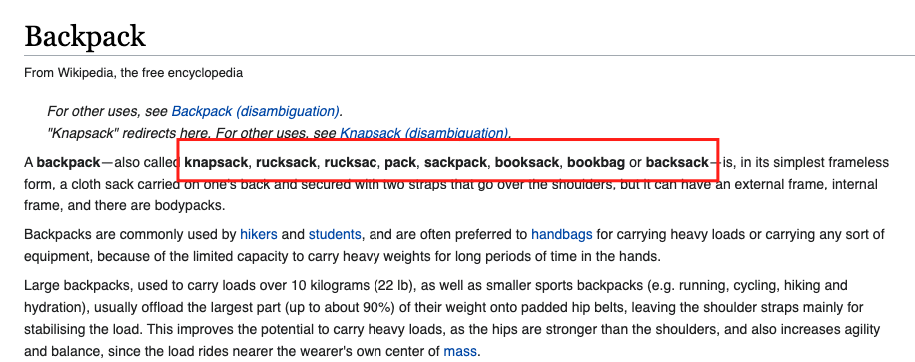
Make sure you have a look at the contents box. These will occasionally reveal excellent category page keywords.
When you’ve drained Wikipedia’s keyword suggestions, it’s time to proceed with one of my favorite tool: SellerApp keyword search tool.
3. SellerApp
SellerApp keyword research provides details about the high search volume of keywords and the purchasing intent of Amazon users. It helps topping up this game, by using the right keywords, you can be at the top organic ranks and get the best positions for your ads.
To use it, Type in the main keyword that describes your product
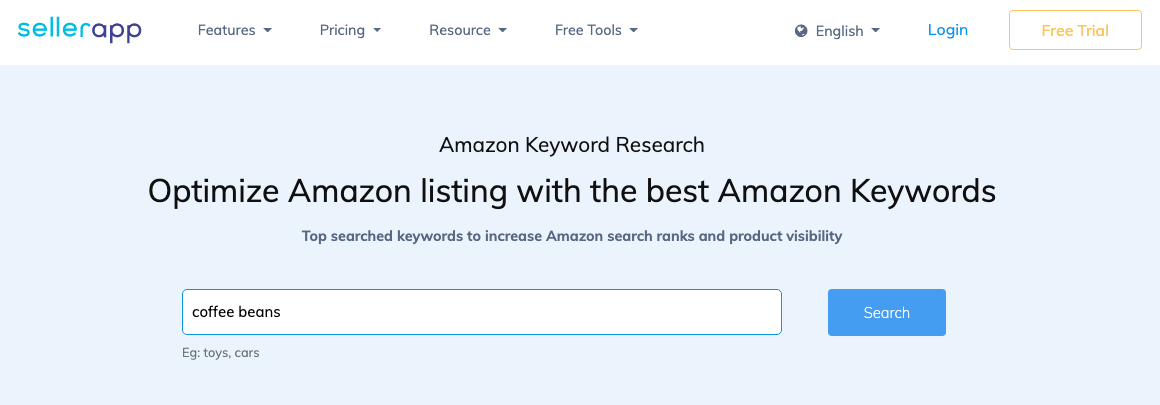
Click on the Search button to get best keywords list for your product, And it will spit out dozens of keyword suggestions.
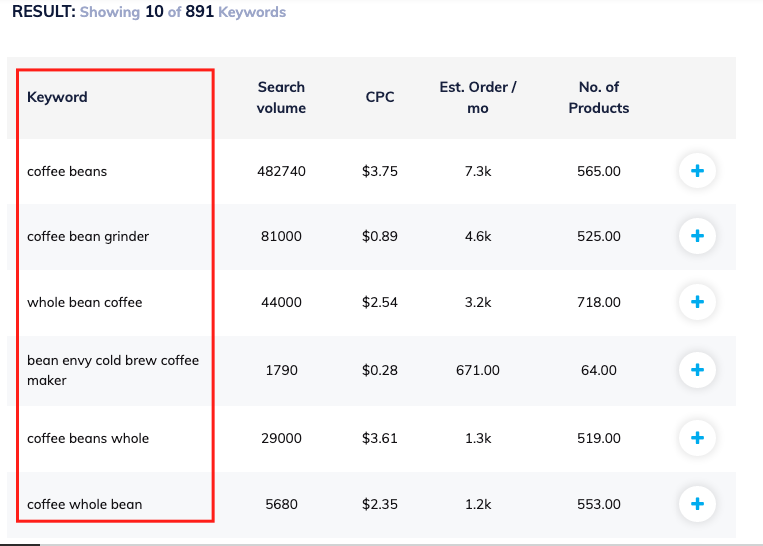
Yup, this tool makes finding longtail keywords from Amazon Suggest significantly faster. However, in my own experience, it gives you more keyword ideas too.
4. Google Keyword Planner
Lastly, we have the excellent Google Keyword Planner.
Even though the GKP can be a halfway good KeywordTool, it’s not very good to generate unique keyword notions.
For Instance, if you enter a category webpage keyword such as “organic pet food” into the GKP, it spits out super-close variations of this term:
That said, if you are doing some digging, you can get some stone which aren’t straight-up variations of this keyword you typed in.
Because the Google Keyword Planner will not generate a Whole Lot of unique keywords, I suggest using it to assess search quantity.
How to choose the best keywords for your eCommerce website?
Since You have a list of Possible keywords In Hand, you Are probably wondering.
Which keywords should you choose?
The clear solution? Make use of this 3-step checklist to recognize the very best keywords for your e-commerce website.
1. Search Volume
All Things Considered, If no one looks for this keyword, it doesn’t matter how hard it converts or the Way competitive Google’s first page happens to be.
There isn’t any way for me personally to give you special search volume tips. In a few industries, 100 searches monthly is A LOT. In others, 10k monthly searches are nothing.
You’ll get an idea of just what a “high volume” and “low volume” keyword is to get the industry through the years.
To locate the search volume for a given keyword, pop it into the GKP. You’ll discover the range of searches in the “Avg. monthly searches” column.
Pro Suggestion: Some keywords have HUGE seasonal variations. You are going to get more searches for “ugly Christmas sweaters” in December than in June. But there are plenty of non-seasonal search phrases which have peaks and valleys all over the world. For example, the keyword “organic pet food brands” has 4x more searches in April than December.
2. Filter keywords related to your product
This is a major one. Let us say you get a keyword that gets tons of searches. Must it be a winner, right?
Well…not really.
That is because the keyword may not be a great fit well in what your site sells.
If the keyword you pick is even a small bit of a stretch in contrast to what you have on the market in your e-commerce site, people that hunt for this term are not going to convert.
Before you move onto the following two stages in this technique, double-check that the keyword you’re considering fits your website, such as a glove.
3. Competition
In the end, it is the right time to understand how hard it’ll be to crack Google’s SERP page.
Here is how:
You’re able to get a keyword’s difficulty score in the SellerApp keyword planner by simply entering a keyword into the search field…
This metric provides you with a good idea of how competitive a keyword is to rank for.
Additional Read:
Amazon SEO: A Complete Guide for Ranking your Listings
The post E-commerce Keyword Research: A Beginners Guide appeared first on Amazon-ASIN Blogs - Latest from Amazon Sellers: News, Advice, and Effective Strategies.
]]>