The post Why Is My Amazon Listing Suppressed and How Do I Fix It? appeared first on Amazon-ASIN Blogs - Latest from Amazon Sellers: News, Advice, and Effective Strategies.
]]>There are many valid reasons why an Amazon listing would be suppressed, but there is only one most common reason for it: violation of policies of Amazon. Some of the most key ones are listed as follows:
- The product listing contains incorrect or misleading information.
- The product sold belongs to those items which are already defined as the restricted items in Amazon.
- Some of the critical information related to product descriptions or customer reviews is not available.
- The listing images fail to meet Amazon’s image guidelines.
- There are numerous customer complaints along with a history of suspensions due to policy violations.
- Another area is that Amazon may also demote a listing for improving the overall shopping experience, particularly if the listing causes confusion or doesn’t match the relevant search queries.
What Does it Mean When an Amazon Listing is Suppressed?
An Amazon-suppressed listing is one that shoppers cannot see-it is completely hidden from search results and completely inaccessible to the public. Amazon suppresses listings it deems do not meet its standards or to otherwise violate its policies. That is to say, listings for best-selling products may be suppressed for whatever reason Amazon has ruled as a reason for doing so.
Suppression is not the same thing as removal, however. Suppressed listings can be reinstated when the problem is fixed. You may have to update the product page or even, in some cases, recreate a listing from scratch.
To determine if some of your listings are suppressed, go to Seller Central, then to the Inventory tab, and click on Manage Inventory. If you have something at the top that says like “Suppressed Listings”, click on that and it will show you which products are flagged. If you do not see this option, you’re good to go!
The Impact of a Suppressed Amazon Listing on Sellers
An Amazon suppression of a listing puts an item out of view in search results due to, among other reasons, selling at very high prices, poor-quality customer reviews, or the wrong product details. Although it might not initially seem so serious, a suppressed listing in Amazon could have a tremendous effect on a seller’s business.
Among other things, suppressed listings hide the item from actual buyers and send sales numbers plummeting.
In addition, suppressed buy box prices usually tend to reduce sales, and also the loss in earnings will be affected.
Lastly, suppressed listings normally tend to damage a seller’s reputation and reduce the overall search visibility. Further, it will affect their IPI score as well, and therefore maintaining a profitable Amazon storefront will be much more challenging.
How can I fix suppressed listings?
Fortunately, suppressed Amazon listing suppression can be easily identified, and solves with a few easy steps. Though, this requires the checking of listings to ensure that everything is up to date and running well.
So here are 5 steps to solve a suppressed Amazon listing:
- Go to ‘Manage Inventory‘ under the Inventory tab in Seller Central.
- If you do have some suppressed listings then you will see a ‘Suppressed’ button appearing. If you don’t see any suppressed listings, then congratulations-things must be going great!
- If the ‘Suppressed’ button is active, click the button and select the listings that you’d like to correct
- Read through and correct any missing information or hit the ‘Manage Images’ button to add missing product images. Every listing comes with an Amazon Product Summary page which usually indicates suppression and quality issues.
- Once corrected, click the ‘Save and Finish’ option to complete the whole process.
How to Prevent Amazon Listing Suppression
The best way to prevent Amazon listing suppression is by closely following all of Amazon’s rules. If you’re finding it difficult to stay on top of what’s permitted, you can use Seller Central to manage product compliance and keep track of any missing documentation. Additionally, the Amazon Listing Quality Dashboard is a valuable tool, as it identifies listings at risk of suppression and provides details on what needs to be updated before issues arise.
What Should I Do if My Listing is Incorrectly Flagged?

At other times, even when you are certain that your listing is within the acceptable standards of Amazon, it will get suppressed because of an unintended prohibited claim. Prohibited claim guidelines maintained by Amazon include the measures that ensure shoppers receive the most honest and accurate information; however, the Amazon algorithm sometimes incorrectly flags certain claims or keywords. Depending on the nature of the problem, there are two basic methods through which suppressed listings that have been flagged incorrectly can be made to alert sellers. These include Stranded Inventory and Performance Notifications.
Stranded Inventory
When a listing is classified as Stranded Inventory, Amazon will delete the ASIN. It can be found on the ‘Manage Inventory’ page as ‘Stranded Inventory’. On the Stranded Inventory page, Amazon will provide a stranded reason, such as a missing characteristic or a wrongly labeled prohibited claim. Sellers can then either dispute or correct the problem.
Often enough, the problem can simply be corrected by editing the copy on the listing. Deleting words such as ‘bugs’, ‘pests’, ‘mildew’, ‘mold’ and ‘insects’ in, for example a pesticide claim usually deletes the ASIN from Stranded Inventory.
Performance Notifications
Performance Notifications are an alert sent to sellers with a specific ASIN flagged for a performance issue. The product detail page could be removed entirely from Amazon, or the seller could just experience an error that must be corrected in order to continue selling. In order to clear Performance Notifications, sellers must provide a Plan of Action consisting of three parts: Root Cause, Corrective Actions, and Preventative Actions.
Sellers can head over to their Voice of the Customer dashboard in Seller Central to see if this ASIN has been flagged and find any recent customer comments concerning this particular performance issue Amazon raised. Upon submission of a proper POA, the performance notification should be removed.
Conclusion
There can also be suppressed listings on Amazon, citing reasons like a violation of the Amazon policy or insufficient critical information; the issues may also be with the product image. Although suppressed listings affect the viewability and sale greatly, it is not completely eliminated from the store as correcting the cause that leads to the suppression might help bring it to life again. With the help of Seller Central tools including Manage Inventory and Amazon Listing Quality Dashboard, sellers are able to identify errors and correct them early. Ongoing monitoring and adherence to policies set by Amazon may help prevent future depressions as well as further the continued success of your business.
The post Why Is My Amazon Listing Suppressed and How Do I Fix It? appeared first on Amazon-ASIN Blogs - Latest from Amazon Sellers: News, Advice, and Effective Strategies.
]]>The post Optimizing Your Amazon Product Detail Page: A Seller’s Guide to Success appeared first on Amazon-ASIN Blogs - Latest from Amazon Sellers: News, Advice, and Effective Strategies.
]]>But what does it mean to make something better? This guide explores the key ways to turn a normal product listing into a sales powerhouse. From writing catchy titles to using top-notch pictures and smart keywords, each part has a big impact on getting seen and making sales. If you’ve been selling for years or you’re just starting out in online shopping, getting good at these methods will help you deal with Amazon’s tricky parts and reach new levels of success on this worldwide platform. Let’s start this journey to improve your listings and make them stand out from the crowd!
A Quick Peek into the Content:
- What is an Amazon product detail page?
- Key Parts of an Amazon Product Detail Page
- Which elements of an Amazon product detail page can you optimize?
- A+ Content on Amazon detail pages
- What to Add to Amazon Product Pages
- The Role of Amazon Launchpad in Enhancing Product Detail Pages
- Conclusion
What is an Amazon product detail page?
An Amazon product detail page is essentially the online amazon storefront for your product, where potential customers can learn everything they need to know before making a purchase. This page is crucial because it showcases your product through various elements like the title, bullet points, description, and images.
How to Create a Standout Amazon Product Detail Page
If you really want to stand out on Amazon, pay attention to crafting a great title with rich content in keywords, optimize bullet points to reflect key features and benefits, and high-quality images that can show what you’re selling from different angles. Ensure the description is clear and engaging to point out what exactly will differentiate your product and strategically choose keywords to increase search visibility.
Key Parts of an Amazon Product Detail Page
- Product Title: Here, you’ll see the product name and brand. Keep it simple and clear using keywords to boost search visibility.
- Images and Videos: The main picture comes with extra photos and videos showing the product from different views or in everyday use. Top-notch visuals play a key role in giving customers a clear idea of what they’re buying.
- Brand Information: This part displays the brand name and might have a link to the brand’s Amazon store helping buyers recognize and trust the brand.
- Ratings and Reviews: Customers can check out the average rating and total review count here. This gives them proof from other buyers about how good the product is.
- Product Details: This part lists specs like size, what it’s made of, and main features. It helps shoppers get a clearer picture of what they’re buying.
- Bullet Points: Key features show up in a short easy-to-read format. This lets customers scan through the most important info.
- Product Description: This section dives deeper into explaining the product. It covers its benefits and what makes it stand out to help convince potential buyers.
- Variations: This area gives customers the option to pick different sizes, colors, or packs of the same item, if available.
- Pricing Information: Customers can easily see the price, any discounts, and Prime eligibility. This helps them understand their options .
- Customer Questions & Answers: Potential buyers can ask questions about the product in this section. Previous customers or sellers can provide answers, which builds trust and gets people involved.
- Related Products: This part shows suggestions for similar items or products often bought together. It aims to encourage customers to buy more.
Rules and guidelines for Amazon detail page
Avoid Duplicate Listings:
Do not place duplicate products that already exist in the Amazon catalog.
Accurate Categorization:
Better Cataloging facilitates better discoverability.
Prohibited Content:
Avoid inappropriate material, personal contact information, pricing details, or promotional links.
Character Limits:
Products should have the title brief to up to 200 characters and ensure it is a relevant and clear title.
Use Clear Language:
Ensure that titles, descriptions, and bullet points are in plain language so that customers understand what they will buy.
Image Standards:
Use Amazon’s image standards when uploading your product images so they are in and out of compliance.
Location Language:
Include all the information for sale on a marketplace in the local language of the location, eg: German for Amazon.de
Which elements of an Amazon product detail page can you optimize?
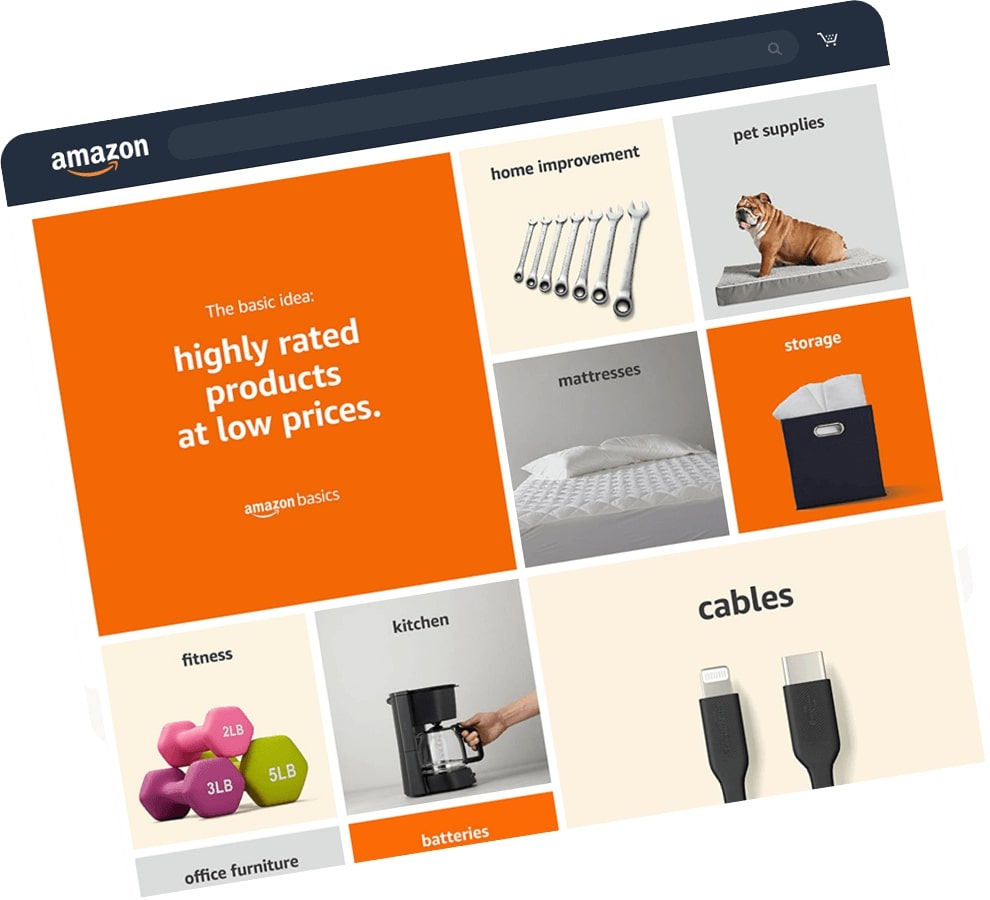
To optimize for profit, you have to focus on both getting potential customers to find your product and encouraging them to make a purchase. Here’s how to enhance your product detail page and attract buyers that may eventually convert their interest into sales.
Do Your Keyword Research
Start by researching keywords that consumers would use in search for your product. Think of how they might actually type in the search bar and be sure to organically include those words within your listing.
Create a Compelling Title
Your product title is the most critical text in determining visibility in search. Use a clear, exciting title that holds important keywords but contains also your product details, though not over 200 characters. An improved title can dramatically increase your click-through rates.
Use High-Quality Images
Invest in good clear pictures from all angles for your product. Easily meet the requirements set by Amazon, and of course, make sure that the first picture can have a white background. Try for at least five images so customers have an idea of what exactly they are getting.
Optimize Bullet Points
Summarize the importance of your product’s attributes and benefits in as few words as possible in bullet points, yet carry the pertinent keywords.
Stretch Your Product Description
In addition to containing the bare essentials, your product description should say more than that. Talk about the benefits, specifications, and possible applications of your product in an interesting manner to make the customer want to purchase it.
A+ Content Optimization
Ensure you are an Amazon registered brand and utilize the facility of A+ Content. It supports the addition of rich media, lifestyle images, and comparison charts that may help make your product more recognizable in the market.
Use Competitive Pricing
Monitor the prices of similar products so that your price is at par without being too low it devours profit margins. Apply such psychological pricing practices like, for instance, $19.99 instead of $20 to really attract more buyers.
Customer Review Management
Satisfied customers should be motivated to provide good reviews, which may play a crucial role in the purchasing decisions of other buyers. The best answer to a customer’s questions or negative comments is a positive one.
Keywords in the Backend
Do not forget your hidden keywords! These amazon backend keywords help the algorithm on Amazon understand what your product is about without cluttering up your visible content. You have up to 250 bytes for these keywords—avoid duplicates and special characters.
Keep an Eye on Performance and Revise
Check constantly how your listings are performing using Amazon’s analytics tools. Be ready to revise things based on keyword trends, customer feedback, and shifts in the market.
A+ Content on Amazon detail pages
If you are an Amazon Brand Registry seller, then you get the great opportunity of adding A+ Content to your product detail pages. This feature allows you to expand your product descriptions, providing you with extra space to add text and lifestyle images, brand stories, and other engaging elements.
Why is A+ Content Important?
Creative freedom is one of the major advantages with A+ Content. Other than making your listings look pretty, it can also express a better representation of the story of your brand. According to Amazon, up to 10% increases in sales are seen when you make use of A+ Content.
What to Add to Amazon Product Pages
Detailed Descriptions: Proffer beyond the surface information. They help to give in-depth information about your product.
Lifestyle Images: This is the images of your product put out in everyday living. To this end, such images will help the customers see a real-life picture with the product.
Brand Story: This describes who you are. It creates a relationship between you and the potential buyer. So, create good comparisons of charts that help the customer decide.
Integrating these factors makes your listing more attractive and enhances customer engagement and confidence. Aimed at giving customers the complete sense of a product, you will be able to substantially improve the chances of conversion.
Common Mistakes to Avoid on Amazon Product Detail Pages
Avoiding Keyword Research
Failure to base your content based on relevant keywords may lead to poor search visibility. Identify keywords that a potential customer will likely use when searching for your product.
Keyword Stuffing
Loading your title, bullet points, or description with overuse of keywords will make it unreadable and unprofessional. Amazon algorithms will also slap penalties on listings that seem spammy. Focus on natural language that offers value to the customer.
Neglecting Available Space
Failure to use the entire space available for description, bullet points, and other content can limit the effectiveness of your listing. Use these sections to give out key information about the benefits and features of your product.
Avoid Using A+ Content
When you are a Brand Registry seller, if you want to have more images with detailed descriptions of your product, you can use A+ Content to engage customers to improve conversion rates.
Poor Quality Images
Providing low-quality images or not enough images about the products would not attract the attention of the customers. Always make sure you include high-resolution images of your product from different angles with lifestyle shots that even show how the product is used.
Wrong Category
Selecting the wrong category can lead to confusion among customers and lessen the discoverability. Be sure you get the right category for your product.
Setting a New Listing for a Product Already Listed
Setting a new listing can declassify your listing if Amazon had the same product listed within its catalog. Before creating a new listing for your product, make sure there is no similar product listed on Amazon already.
Missing Out on Customer Reviews
Ignoring customer reviews, be it a negative or positive one, may influence your reputation. It shows you care about your customers’ opinions and builds trust.
Incorrect Formatting
Titles and descriptions that are not formatted correctly make your listing look messy and unreadable. Your content needs to be concise, logical, and according to Amazon’s style guideline.
The Role of Amazon Launchpad in Enhancing Product Detail Pages
Amazon Launchpad is an important avenue through which there exists enhancement of the product detail pages. This feature greatly touches on products that are new and innovative. It helps startup companies and emerging brands, making it easy for them to showcase their products on Amazon. How Amazon Launchpad Enhances Product Detail Pages
More Visibility: Amazon Launchpad provides more visibility to the products. This section features distinctive and innovative products that can be easily browsed on this part.
A+ Access for Contents: Brands participating in the services offered by Amazon Launchpad may make use of A+ Content, enriching the product descriptions with more text, lifestyle images, and even a company story which will all be helpful in creating an interesting shopping experience.
Custom Branding: Brands can narrate their story on product detail pages through customized branding elements offered by Launchpad. Brands are able to develop a bond with potential customers and increase recognition of the brand name.
Promotional Support: Amazon generally launches marketing campaigns for the products listed under Launchpad through email campaigns, social media, and other marketing channels. These increased traffic and sales are the result of promotional support.
Customer Trust: Joining Launchpad with Amazon can help a new brand attain some good reputational badges. Customers will be assured of buying from a brand that Amazon endorses if they are assured it meets some form of acceptable quality standards.
Access Analytics: Sellers in the program have analytics that will enhance listings and enable a seller to understand better what’s going on with the customers.
Conclusion
An optimized Amazon product detail page will include many high-quality images, rich and clear product descriptions, strategically placed keywords related to buyer search intent, compelling bullet points as enhanced brand content highlighting the key features and benefits of the product. Critical support for the trust that’s required comes from positive customer reviews and ratings. Periodic revision and refreshing with performance metrics would help sustain a competitive advantage. Finally, A+ Content can make the story better; hence, it may impact the overall attractiveness of the product.
The post Optimizing Your Amazon Product Detail Page: A Seller’s Guide to Success appeared first on Amazon-ASIN Blogs - Latest from Amazon Sellers: News, Advice, and Effective Strategies.
]]>The post Amazon Bullet Points That Sell: Seller’s Guide for Success appeared first on Amazon-ASIN Blogs - Latest from Amazon Sellers: News, Advice, and Effective Strategies.
]]>Quick Guide:
- What Are Amazon Bullet Points?
- Why Are Bullet Points Crucial for Your Listing?
- Key Elements of Effective Amazon Bullet Points
- Step-by-Step Guide to Writing Compelling Bullet Points
- Optimizing Amazon Bullet Points for SEO
- Advanced Tips for Optimizing Amazon Bullet Points
- Tools and Resources for Amazon Sellers
- Conclusion
What Are Amazon Bullet Points?
Amazon bullet points are short descriptive phrases under the product title on an Amazon product listing page. They provide a quick overview of your product’s key features and benefits. The bullet points and your product images are the first things potential customers see about your product, so they need to be compelling.
What is the ideal length of Amazon bullet points
Amazon bullet points should be concise, around 1 to 2 short sentences. Sellers are allowed up to 500 characters, while vendors have a limit of 250-255 characters. Vendors can use up to 10 bullet points, each with a maximum of 250 characters, requiring them to use their limited space wisely.
Emphasize Key Features and Benefits in your bullet points
Focus on the key features and main benefits of your product. For example, if it’s a kitchen gadget, highlight things like “Saves time chopping and slicing”, “Dishwasher safe components for easy cleaning”, or “Anti-slip base for safety and stability”. Mention innovative or differentiating features.
Make use of power words while writing your bullet points
Use engaging and emotive language to bring your bullet points to life. Words like “premium”, “revolutionary”, “amazing” or “best-in-class” help convey quality and excitement. Mentioning the benefits, like “effortless”, “simplifies” or “enhances” helps the customer understand the product’s usefulness.
Optimize your Amazon bullet points for Search results
Use relevant keywords in your bullet points, especially those matching your product title and listing. Having semantic keywords, synonyms and related terms in your bullet points helps the listing rank better in Amazon search results. But don’t overstuff – bullet points should sound natural.
Why Are Bullet Points Crucial for Your Listing?
Bullet points are essential for creating an eye-catching Amazon product listing. They draw attention and make information easy to digest, which is key when most shoppers only glance at listings for a few seconds.
They Highlight Key Features and Benefits
Bullet points prominently showcase your product’s best features and customer benefits. Focus on things like:
- Innovative or premium materials: For example, “Made of lightweight, durable aluminum alloy” or “100% organic cotton fabric.”
- Key specifications: Such as size, dimensions, battery life, etc. For example, “6-inch full HD display,” “Runs for up to 10 hours on a single charge,” or “BPA-free and dishwasher safe.”
- Standout qualities: Like “4K video recording” or “Noise canceling technology.”
- Valuable extras: Such as accessories, warranties, free returns, etc. For example, “Includes travel case and 3-year warranty” or “30-day free returns.”
They Make Scanning Easy
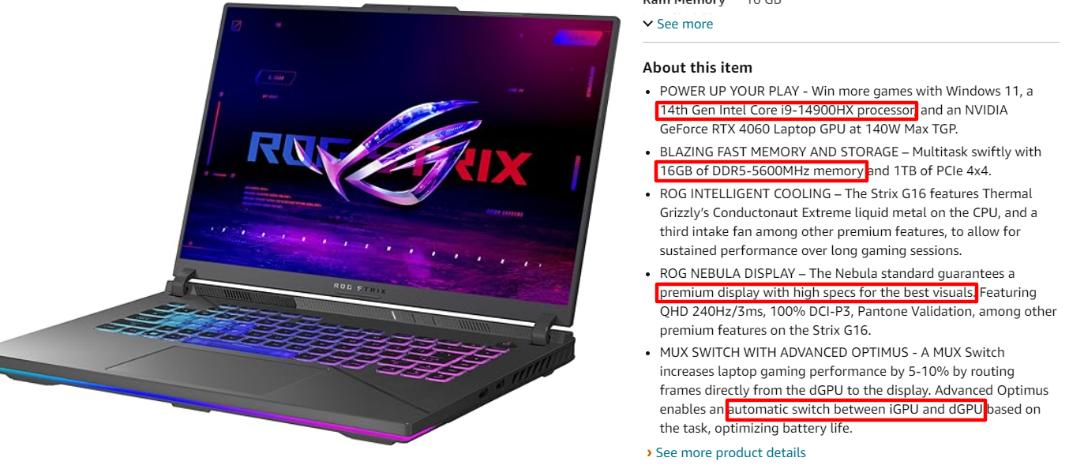
Bullet points make it simple for shoppers to scan your listing and find the most important details at a glance. Keep your bullets concise, starting each with an impactful adjective or verb followed by a compelling benefit. For example:
•14th Gen Intel Core i9-14900HX processor
•16GB of DDR5-5600MHz RAM
•premium display with high specs for the best visuals
•automatic switch between iGPU and dGPU based on the task
They Improve Readability
Bullet points visually break up blocks of text, making your listing easier to read. Use them with short paragraphs, headers, and images for the most readable layout. Keep your bullets around 2 to 3 lines max, and leave an empty line between bullets for the cleanest look.
Well-crafted bullet points are key to optimizing your Amazon product listing. You’ll capture shoppers’ attention and drive more conversions by highlighting key features, benefits, and specifications in an easy-to-scan format.
Key Elements of Effective Amazon Bullet Points
To optimize your product listing and boost sales on Amazon, well-crafted bullet points are essential. Short and Scannable With limited space, keep your bullet points concise and straightforward. Focus on your product’s key features, benefits and specifications. Aim for 3 to 5 bullet points of 1 to 3 short sentences or 1 medium sentence. This makes it easy for customers to quickly scan and comprehend your product’s main selling points.
Keyword-Rich
Strategically include important search keywords and related terms in your bullet points to improve visibility on Amazon. For example, if selling a wireless Bluetooth speaker, you may say “Connect via Bluetooth 5.0 for full wireless streaming from any Bluetooth-enabled device up to 30 feet away.” This incorporates keywords like Bluetooth, wireless, streaming, and device. Just be sure to do so in a natural way.
Solution-Oriented
Rather than just listing the product specifications or attributes, focus on the solutions, benefits and value your product provides customers. For example, instead of “Rechargeable lithium-ion battery provides up to 8 hours of playtime per charge”, say “8 hours of portable power – enjoy your favorite music all day long with a long-lasting rechargeable battery”. This emphasizes the benefit of extended, all-day listening.
Quantifiable and Specific
Use solid facts, numbers and statistics to demonstrate your product’s features and performance. Be as precise as possible. For example, say “360° omni-directional sound from 5 high-performance neodymium drivers” rather than “great sound quality”. Providing concrete details builds credibility and gives customers a better sense of what your product can do.
Consistent Messaging in your bullet points
Ensure your bullet points work together to convey a consistent message and value proposition about your product. Repeat or rephrase key selling points and benefits across the bullet points to reinforce the most important details you want customers to remember. This also creates a cohesive listing that is more compelling and persuasive.
Step-by-Step Guide to Writing Compelling Bullet Points
Focus on benefits, not features
Bullet points should highlight your product’s benefits and key selling points, not just list features. Focus on what your product can do for customers and how it can improve their lives. For example, instead of “12 ounce container” say “Portable size is perfect for travel.”
Keep them scannable
People tend to skim when reading bullet points, so keep them concise and compelling. Aim for 1 to 2 short sentences or 40 characters for each point. Use dynamic and descriptive language to draw the reader in while still being scannable. For example, say “Experience rich, bold flavor” instead of “Dark roast coffee.”
Include numbers and stats
Incorporate numbers, stats, ratings or facts into your bullet points when possible. For example, say “Over 10 million customers worldwide” or “Rated #1 in customer satisfaction.” Numerical figures help to strengthen your key selling points and make the benefits more concrete and believable. However, only include stats and numbers if they are factual and relevant.
End on a high note
Save your most compelling benefit or key selling point for the last bullet point. Readers will remember this the most, so end your list on a persuasive note. For example:
• Award-winning design
• Durable, all-weather construction • Lifetime warranty and total peace of mind
Optimizing Amazon Bullet Points for SEO
Amazon bullet points are one of the most important parts of your product listing page. They determine whether shoppers will click to learn more about your item or scroll past it. Optimizing your bullet points for Amazon search engine optimization (SEO) helps ensure you get noticed.
Include keywords
When crafting your bullet points, be sure to include important keywords that relate to your product. Consider the words customers might search for to find an item like yours. For example, if selling a dog leash, you might mention “dog leash, leash, pet leash, dog walking, dog accessory” and similar terms. Place these keywords or use long tail keywords prominently in your first bullet point.
Write naturally
While keywords are important, your bullet points should sound natural to human readers. Don’t overstuff them with keywords or they’ll seem spammy. Aim for a mix of long and short bullet points with a conversational tone. Keep sentences around 15 to 20 words for the best flow. Read your bullets aloud to make sure they sound genuine.
Focus on benefits
Rather than just listing product features, focus on the key customer benefits. For example, instead of “Made of high-quality nylon material”, say “Durable nylon material provides a comfortable, customizable fit for your dog”. Benefit-focused bullet points are more compelling and help convince customers your product is right for them.
Use numbers and stats
Incorporate numbers, stats, measurements, and quantifiable facts about your product into the bullet points when possible. For example, “Extends up to 6 feet” or “Backed by a lifetime warranty”. Concrete details like these help customers understand exactly what they’re getting and build trust in your listing.
Place most important points first
The first 1-2 bullet points are the most visible, so put your most persuasive selling points there. Mention your premium materials, innovative features, excellent reviews, brand reputation, or product awards. The points you lead with should give customers a reason to choose your item over the competition.
Optimizing your Amazon bullet points with an SEO focus and persuasive messaging helps turn casual viewers into eager customers. Place your product’s keywords, benefits, quantifiable details, and most compelling selling points front and center in your bullets to boost visibility and increase your Amazon conversionson.
Advanced Tips for Optimizing Amazon Bullet Points
Once you have the basics of optimizing your bullet points, it’s time to take it to the next level. The following advanced tips can help boost your product rankings and increase conversions.
Use Dynamic Keywords
Include relevant keywords and phrases in your bullet points, but don’t just repeat the same keywords repeatedly. Use synonyms and related terms as well. For example, if you’re selling a laptop, you might say “powerful processor” in one bullet, “fast Intel i7 chip” in another, and “16GB of quick RAM” in a third. This helps you rank for a wider range of searches.
Write Benefit-Focused Points
Rather than just listing features, focus on the key benefits to the customer. Say how the feature improves their experience or solves a problem. For example, instead of “touchscreen display,” “intuitive 10-point multitouch display lets you navigate with simple finger swipes and taps.” This helps the customer understand the value.
Include Calls to Action
Add urgency and encourage customers to buy now with strong calls to action like “buy now and save 10%” or “only 5 left in stock—order today!” These types of messages motivate shoppers to click the buy button.
Use Eye-Catching Formatting
Make important points stand out using bold text, bullet points, spacing, and numbering. For example:
• Fastest processor in its class: Intel i7 chip and 16GB RAM blaze through tasks • Massive storage: 1TB solid-state drive has plenty of room for photos, movies, music and more
• Stunning graphics: NVIDIA GeForce RTX 2060 graphics card delivers incredibly lifelike visuals for gaming and video editing
The bold text draws attention to each point’s main benefit or feature. The spacing and bullet formatting make each point easy to read.
Check Your Grammar and Spelling in your Amazon bullet points
Careless errors damage your credibility and professionalism. Double check that there are no typos, grammar issues or spelling mistakes in your bullet points before publishing your listing. Even a slight errors can reflect poorly on your business and turn off customers.
With the right techniques, you can create Amazon bullet points that highlight the benefits of your product, motivate customers to buy, and help your listing rank higher in Amazon’s search results. Put these advanced tips into practice and watch your product page become more compelling and conversion-optimized.
Tools and Resources for Amazon Sellers
As an Amazon seller, having the right tools and resources is key to success. Some essentials to have in your toolkit include:
Keyword Research Tool
Choosing the right keywords to optimize your product listings and drive organic traffic. A keyword research tool specifically for Amazon like MerchantWords or Amazon-asin keyword tool allows you to find popular search terms within your niche, see how competitive they are, and get estimates of the search volume. With this data, you can select keywords to drive traffic to your listings.
Product Research Tool
Before launching a new product, you must determine if it will be profitable and in demand. A product research tool such as SellerApp or Profitguru lets you analyze trends, see how competitive a product niche is, find opportunities, and make data-driven decisions about what to sell. They provide monthly sales, revenue, reviews, and seasonality metrics to help you find winning products.
Listing Optimization Tool
Once a product is ready to sell, you must create an optimized listing to drive conversions and sales. A tool like Amazon-Asin listing quality checker can help you write compelling titles, bullet points and descriptions, choose effective images, set competitive prices, and make ongoing improvements to your listings. They analyze what’s working for the top-ranked listings in your category so you can emulate their success.
Feedback and Review Management
Customer feedback and reviews are essential for building social proof and trust in your brand. A tool such as eKomi or Feefo lets you proactively ask buyers to leave reviews and ratings, respond to reviews, report abusive reviews, and gain insights into how to improve your products and services based on customer comments. Monitoring reviews and managing your reputation in one place saves time and helps provide great customer experiences.
Using a combination of tools like these, you’ll have everything you need to research products, optimize listings, drive traffic, get reviews and feedback, and ultimately succeed as an Amazon seller. While the range of options can seem overwhelming, start with the basics and you can always scale up and add more advanced tools as your business grows.
Conclusion
And there you have it – everything you need to know to crush it with Amazon bullet points in 2024. By focusing on the customer, highlighting your product’s benefits, and strategically using power words and formatting, you can write compelling bullet points that convert. Keep testing and optimizing as you learn more about your customers. With practice, you’ll write a bullet point copy that sells itself.
The post Amazon Bullet Points That Sell: Seller’s Guide for Success appeared first on Amazon-ASIN Blogs - Latest from Amazon Sellers: News, Advice, and Effective Strategies.
]]>The post A Comprehensive Guide to Amazon Product Attribute Targeting for Sales Surge appeared first on Amazon-ASIN Blogs - Latest from Amazon Sellers: News, Advice, and Effective Strategies.
]]>Amazon is the largest online retailer globally, with millions of customers searching for products every day. To make your products more visible and increase sales, it’s crucial to understand how to effectively use product attribute targeting.
In this strategic guide, we will explore how to leverage Amazon product attribute targeting to optimize your product listings, reach your target audience, and ultimately boost your sales. By implementing these tactics, you can increase your visibility and improve your chances of success in the competitive world of Amazon sales.
A Quick Peek into the Content:
- What are Amazon product attributes Targeting?
- Understanding the benefits of product targeting on Amazon
- How to identify the right product attributes for targeting
- Best Strategies for Product Attribute Targeting
- Step-by-Step Guide to Setting Up a New Product Targeting Campaign on Amazon
- Optimizing your product targeting ads on Amazon
- Utilizing negative product targeting in Amazon
- Conclusion
What are Amazon product attributes Targeting?
Amazon product attribute targeting allows you to target potential customers based on the attributes of products they’ve viewed or purchased. This powerful targeting option allows you to reach audiences that have expressed interest in specific types of products.
For example, say you sell hiking boots. You could create an ad targeted at customers who have recently viewed or purchased products like:
- Backpacks
- Hiking socks
- Trail snacks
- Camping tents
By targeting these related product attributes, you’ll reach people actively shopping for hiking gear and more likely to be interested in your boots.
How does attribute targeting work?
Amazon uses the product attributes and categories to determine a customer’s interests and likely future purchases. When a customer views or buys a product, Amazon captures attributes like:
- Brand
- Price
- Category
- Color
- Size
- And more
Amazon then uses these attributes to build an interest profile for each customer. Your ads can target specific attributes that match your product to reach the most interested shoppers.
Why is Amazon Attribute Targeting so effective?
Attribute targeting works so well because it allows you to reach high-intent customers at the perfect moment. By targeting recent views and purchases of complementary products, you’ll reach shoppers:
- Already primed for a purchase in your product category.
- Actively researching and comparing options.
- Ready to buy from a brand they trust.
This precision targeting results in higher click-through rates, lower costs, and increased sales. While broad targeting casts a wide net, attribute targeting uses a precision rifle to reach only the most promising prospects.
Understanding the benefits of product targeting on Amazon
On a platform as massive as Amazon, strategically optimizing your product listings is key to driving more traffic and boosting sales. Targeting your products to the right audiences can make a huge difference.
Reach More Potential Customers
By selecting product attributes to target your listings to, you open them up to more shoppers who are specifically searching for those Amazon product attribute. If you’re selling a waterproof fitness tracker, for example, targeting attributes like “waterproof”, “fitness”, and “activity tracker” would expose your listing to anyone searching those terms.
Higher Conversion Rates
When shoppers land on a listing that precisely matches what they were searching for, they’re more likely to buy. Targeting helps ensure your listings are shown to those with a high purchase intent for that type of product. Studies show Amazon product attribute targeting can increase conversion rates by up to 25%.
Improved Ranking
The more relevant your listing is to searchers, the higher Amazon will rank it in results. Targeting product attributes helps establish relevancy, which translates to better ranking. The higher your listing ranks, the more visibility and traffic it will get.
Valuable Insights
The attributes you target also provide insights into what customers are searching for and interested in. You can use this data to make informed decisions around things like product development, bundling, and marketing. The attributes driving the most traffic to your listings are clearly resonating with your target audience.
How to identify the right product attributes for targeting
To boost your sales on Amazon through product attribute targeting, you first need to determine which attributes are most relevant for your products. Some attributes, like brand, size or color, may seem obvious. But dig deeper—there are more niche attributes that could help you reach very specific segments of buyers.
Focus on your product category
Start by evaluating the standard attributes used to describe products in your category. For books, this includes attributes like author, publication date, genre and language. For clothing, consider attributes such as style, pattern, neckline and sleeve length. Choose 3-5 of the most distinguishing attributes for your products. These will be the attributes you want to target.
Consider your customer base
Think about the types of customers who buy your products. What attributes do they commonly filter or sort by? If you sell children’s toys, customers may filter by age range, brand and toy type. For gardening tools, attributes like tool type, blade size and handle material are likely to resonate with buyers. Choose attributes that align with how your target customers shop.
Check competitor’s listings
See what attributes your competitors are using in their product listings and target those same attributes. Some competitors have already done research to determine what attributes resonate most with their shared customer base. You can piggyback off their work. Look for attributes they prominently feature, especially those used in product titles, bullet points and enhanced product descriptions.
Analyze your sales data
If you already have sales data, dig into it to detect patterns. Are certain attributes associated with higher sales volumes or conversion rates? For example, you may find products targeting the “mystery” or “science fiction” genre sell very well for your books. Or clothing in “petite” and “plus” sizes could be top sellers. Let data-driven insights guide your attribute targeting.
With the right Amazon product attributes identified and targeted, you’ll be poised to boost sales on Amazon. Keep testing and optimizing to reach the most potential buyers and truly master the art of attribute targeting.
Best Strategies for Product Attribute Targeting
Identify your best selling products
Take a look at your sales data to see which products are generating the most revenue and selling the fastest. These are your winners that you’ll want to focus on for targeting. See if there are any common attributes among these products, like a specific brand, size, color or other feature. These attributes are resonating with your customers and driving sales.
Research customer reviews and questions
Dig into the reviews and questions on the product pages for your bestsellers. Look for any mentions of attributes that customers say they particularly liked or were interested in. For example, if customers frequently call out a product’s durability or ease of use, those are attributes you’ll want to highlight in your targeting. Pay attention to any attributes that come up again and again.
Choose highly searched attributes
In addition to attributes mentioned in reviews, you’ll want to target attributes that customers are actively searching for. Use a keyword research tool to see which product attributes and related terms are most searched for in your category. The more searched an attribute is, the more customers are interested in and looking for products with that attribute. These highly searched attributes should be priorities in your targeting strategy.
Test and optimize different attributes
Start testing different attributes in your product targeting to see which ones resonate most with your customers. You might target attributes like brand, size, color, features, materials or certifications. Measure which attributes drive the most traffic to your product pages and ultimately the most sales. Then double down on the attributes that are performing the best, and consider dropping or revising any underperforming attributes.
Continuously optimizing your product attribute targeting based on sales data, customer feedback and search trends will help boost visibility of your bestselling products. And the more targeted traffic you drive to those products, the more your sales and revenue will grow. With the right combination of product attributes highlighted, you’ll tap into what your customers want and keep them coming back for more.
Step-by-Step Guide to Setting Up a New Product Targeting Campaign on Amazon
The key to boosting sales on Amazon is reaching the right customers with your product listings. Setting up a product targeting campaign allows you to show your products to shoppers who are most likely to buy them. Here’s how to create a campaign and get started:
Choose Your Product Targeting Type
There are two options: automatic targeting and manual targeting. Automatic targeting uses Amazon’s algorithm to determine the best audiences and keywords for your products. Manual targeting gives you full control to choose audiences and keywords yourself. For most sellers, automatic targeting is the easiest way to get started. You can always switch to manual targeting as you gain experience.
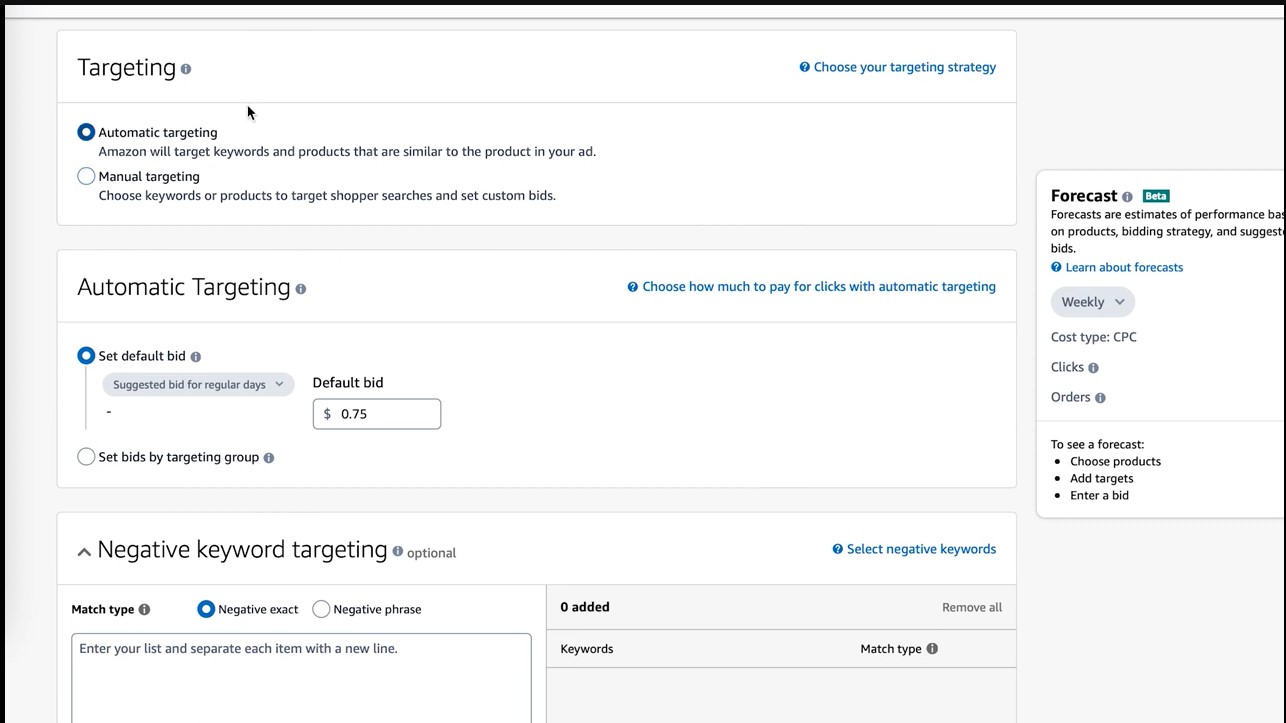
Select Campaign Details
Next, give your campaign a name and budget. A good rule of thumb is to start with a budget of at least $25 per day. Choose a duration of either continuous or for a fixed time period. For your first campaign, continuous is a good choice.
Choose Your Products
Add the ASINs or SKUs of the products you want to target. You can include up to 100 products in a single campaign. Focus on a small group of related products to start, so you can optimize the campaign before expanding to more products.
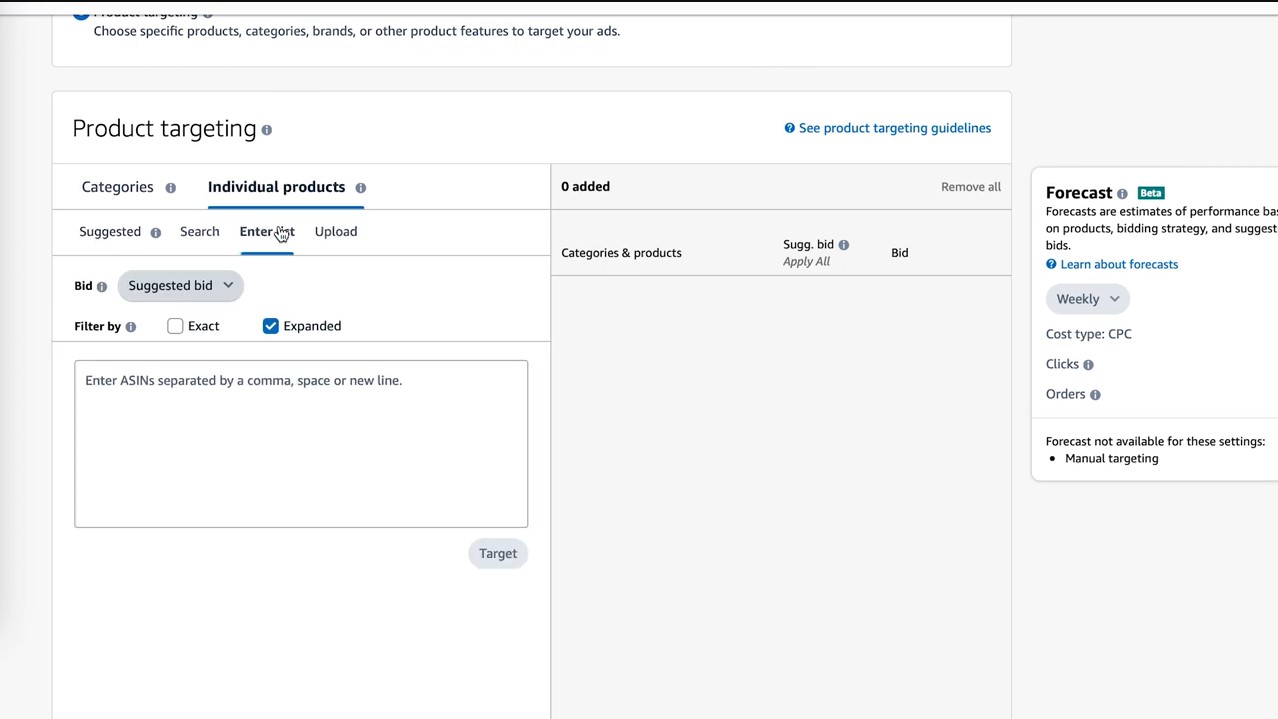
Review and Launch
Amazon will automatically generate suggested keywords and audiences for your campaign based on the products you selected. Review these and make any changes you want. When you’re satisfied, launch your campaign to start reaching targeted shoppers right away.
Optimize and Improve
Check on your campaign regularly to see how it’s performing. Look at metrics like impressions, clicks, conversion rate, and sales. Make changes to improve add or remove keywords and audiences, increase or decrease your budget, or edit product listings. Product targeting takes continuous optimization to maximize your results.
With the right audience targeting and content, product targeting campaigns can significantly boost traffic and sales. Start small, track your metrics, and optimize over time for the best performance. You’ll be reaching the perfect customers for your products in no time!
Optimizing your Product Targeting Ads on Amazon
Choose Relevant Keywords
To optimize your product targeting ads, focus on using relevant keywords that accurately describe your product. Think about what words your potential customers might actually search for to find a product like yours. Include product category, function, features, brand, and model names.
For example, if you’re selling a blue casual cotton dress, use keywords like “blue dress,” “casual dress,” “cotton dress,” as well as more specific terms like “short sleeve dress” or “knee length dress.” Also include words that refer to the style, cut or pattern of the dress like “A-line,” “shift,” or “floral print.”
Amazon allows you to use up to 5 keywords for your product ads, so choose them wisely based on potential search volume and relevance. Review the search terms report in your Amazon Seller Account to see what words customers are actually using to find your product.
Optimize Your Copy and Images
Well-written ad copy and high-quality images are key to catching customers’ attention and driving more traffic to your product listing. Focus your copy on the key benefits and features of your product using an enthusiastic and compelling tone. Keep your text brief, around 2 short sentences or a short paragraph.
Use eye-catching product images that show your item clearly against a plain white background. Make sure the main image shows the entire product so customers know exactly what they’re getting. Include close-up detail shots and lifestyle images when possible to give a better sense of your product in use.
Choose Relevant Product Targeting Types
Amazon lets you target ads to specific products, brands, categories or search terms. For the best results, choose targeting options that are highly relevant to your product. Target competing products or brands, or categories and subcategories that directly relate to your item. Broad search term targeting typically leads to lower click-through rates, so start narrowly focused.
Monitor your ad performance and make changes to improve your click-through rate and conversion rate. Adjust your keywords, copy, images or targeting to optimize your ads over time. With the right targeting and optimization, product ads can be an effective way to increase sales on Amazon.
Utilizing negative product targeting in Amazon
Negative product targeting allows you to exclude certain products from showing up as suggested or related items to your listing. This strategic method can help boost your product’s visibility and sales on Amazon.
As a seller, you want shoppers focused on your product, not distracted by competitors. By blocking certain products from appearing alongside yours, you refine the selection and gain more prominent placement. Say you sell a particular model of Bluetooth speaker. You could block suggestion of other brands’ comparable speakers to position yours as the top choice for customers.
To utilize negative product targeting, you will need to provide Amazon the ASINs (Amazon Standard Identification Number) of products you wish to block. You can find a product’s ASIN on the product detail page URL or by using a free ASIN lookup tool.
Once you have the ASINs, here are the steps to block products:
- Log in to Seller Central and go to Advertising > Negative Product Targeting.
- Click “Create targeting rule”. Select the product you want to target by entering its ASIN, UPC or keyword.
- Choose whether you want to target all products under a brand or only specific products. Enter ASINs of individual products or use brand name to block all products of a brand.
- Select the categories and subcategories where you want to block the products. You can choose from categories your product is listed under.
- Name your rule and save it. The rule will start blocking products within 1 hour.
- Check how your negative product targeting is impacting your product and make changes as needed. You can delete or edit rules at any time.
Negative product targeting is a powerful way to optimize your product placement and boost sales on Amazon. Be strategic with your choices and start with blocking your closest competitors. See how customers respond and make adjustments to continue improving your product’s visibility. With the right negative targeting in place, your product can reach more shoppers and sell more units.
Conclusion
You’ve learned the key steps to boosting your Amazon product sales through attribute targeting. By focusing on the product details that set you apart, you can reach high-intent customers and increase conversions.
To recap, start by determining what makes your product unique. This could be a special feature, patented technology, organic ingredients, or anything else that differentiates you from competitors. Emphasize these attributes in your product listings by using emotive and persuasive language, visuals like professional photos, and specific keywords.
Next, build your ad campaigns around these attributes. Use responsive search ads that prominently feature your key selling points. Bid on keywords related to your unique attributes and the benefits they provide. This helps ensure your ads are shown to people specifically looking for what you offer.
Finally, optimize your product detail page to highlight your key attributes. Place attribute information, visuals and persuasive copy “above the fold” where visitors see it first. Use consistent messaging across your title, bullets, description and images. Offer free trials, samples or demos when possible so customers can experience your product attributes firsthand.
By leveraging these strategic techniques, you can achieve product attribute targeting mastery. Your high-value, differentiated offerings will get noticed, desired and purchased by those looking for exactly what you sell. Sales and profits increase as you attract and convert ideal customers effortlessly.
The post A Comprehensive Guide to Amazon Product Attribute Targeting for Sales Surge appeared first on Amazon-ASIN Blogs - Latest from Amazon Sellers: News, Advice, and Effective Strategies.
]]>The post Amazon Product Photography: Elevate Your Listings with Stunning Visuals appeared first on Amazon-ASIN Blogs - Latest from Amazon Sellers: News, Advice, and Effective Strategies.
]]>Quick Guide:
- What Is Amazon Product Photography
- How Does Amazon Product Photography Increase Conversion Rates
- How to Take Pictures for Amazon
- How to Add Photos to Amazon Product Listing
- Why Amazon Product Photography Is So Important
- Should You Hire a Professional Product Photographer?
What Is Amazon Product Photography
Amazon product photography is a specialized branch of commercial photography that focuses on creating high-quality images of products specifically for listings on the Amazon platform. These product images are designed to showcase items in a visually appealing and informative manner, helping potential customers make informed purchasing decisions. In essence, Amazon product photography is the art of capturing, editing, and presenting products through images to attract, engage, and convert online shoppers.
Types of Amazon Product Photography
Product-only Photography
This type involves capturing clear, high-resolution pictures of the product against a neutral background, typically white. These images focus solely on the product, providing potential buyers with a detailed view of its features, design, and specifications. Product-only photography is essential for fulfilling Amazon’s image requirements and offering a straightforward representation of the item.
Lifestyle Photography
Lifestyle images depict the product in real-life scenarios, showing how it can be used or integrated into a customer’s daily life. These images help potential buyers visualize the product’s practicality and benefits, making it easier for them to connect with the item on a personal level.
Infographic or Feature-focused Photography
Infographic images highlight specific features or attributes of the product. These may include close-ups of details, diagrams, or images with text overlays explaining key product information. Infographics provide a quick and clear way to convey essential details.
Group or Variation Photography
For products available in multiple colors, sizes, or configurations, group or variation photography is vital. These images display all available options within a single shot, allowing customers to see the range of choices at a glance.
Packaging and Unboxing Photography
Particularly relevant for items in the beauty, electronics, and luxury goods categories, this type of photography showcases the product’s packaging and the unboxing experience.
360-Degree Photography
These images provide an interactive view of the product, allowing customers to rotate the item and examine it from every angle. This type of photography can be especially helpful for products with intricate details or multiple features.
Video Content
While not strictly photography, videos are an integral part of Amazon product listings. They can include product demonstrations, how-to guides, or customer testimonials. Videos engage and dynamically inform potential buyers.
Objectives of Amazon Product Photography
The primary objectives of Amazon product photography are as follows:
Inform and Educate
Product images should provide essential information about the product, including its appearance, size, color, and features. Customers rely on these images to make informed purchase decisions.
Attract and Engage
High-quality, visually appealing images capture the attention of online shoppers and encourage them to explore the product further.
Build Trust
Clear, well-lit, and professionally presented images instill confidence in the product’s quality and authenticity. They help customers trust the seller and the item they are considering.
Differentiate and Persuade
Effective product photography sets your listing apart from competitors. It highlights the unique selling points of the product and persuades customers to choose your offering.
Enhance the Shopping Experience
Lifestyle and usage images can enhance the customer’s shopping experience by helping them visualize how the product will fit into their lives.
Meet Amazon Guidelines
Amazon has specific image requirements that must be met for each product category. Adhering to these guidelines is necessary to ensure your products can be listed and featured prominently on the platform.
How Does Amazon Product Photography Increase Conversion Rates
When it comes to e-commerce, Amazon product photography plays a pivotal role in driving conversion rates—turning casual browsers into satisfied customers. This section explores the underlying psychology of visual content in marketing, demonstrates the real impact of quality product photos, and provides compelling statistics on how photography significantly boosts conversion rates on the Amazon platform.
The Psychology of Visual Content in Marketing
One of the most effective marketing tools is visual content because it taps into the fundamental way our brains work. It’s been said that we’re visual creatures, and research backs this up. Here’s how the psychology of visual content influences purchase decisions:
Immediate Impression
When a potential customer lands on an Amazon product page, their first impression is often formed by the images. Text takes much longer for the brain to process than visual information, and these initial milliseconds can make or break a sale.
Emotional Connection
High-quality images can evoke emotions. This can be through aspirational lifestyle shots or by conveying trust and credibility through professional product images. Emotions influence purchase decisions, and visuals are a powerful conduit for that.
Information Absorption
People tend to retain visual information better than text. This means that the details and features of a product are more likely to stick in a customer’s mind when presented visually.
Reduced Cognitive Load
Clear, informative images reduce the cognitive load on customers. They don’t have to wade through paragraphs of text to understand the product, making the shopping experience more enjoyable and efficient.
Visual Storytelling
Visuals have the power to tell a story. They can show the benefits, uses, and solutions a product offers, all without the need for lengthy descriptions.
Demonstrating the Impact of Quality Product Photos
The impact of quality product photos can’t be overstated. Here are some ways in which they make a difference:
Improved Perceived Value
When products are presented professionally and look their best, customers are more likely to perceive them as valuable and of higher quality. This perception can lead to higher price tolerance and increased sales.
Reduced Return Rates
High-quality images accurately represent the product, reducing the chances of customers receiving something different from what they expected. As a result, return rates decrease, leading to cost savings and better customer satisfaction.
Increased Click-Through Rates
Well-crafted images pique the curiosity of potential buyers, encouraging them to click on the product listing to learn more. This increased interest translates into higher click-through rates, a crucial step in the conversion process.
Enhanced Trustworthiness
Quality images help establish trust in your brand and the authenticity of your products. When customers trust what they see, they’re more likely to proceed with the purchase.
Higher Conversion Rates
Ultimately, the goal of Amazon product photography is to boost conversion rates. By creating a visually appealing and informative shopping experience, customers are more likely to complete their purchase, contributing to higher conversion rates.
Statistics on Conversion Rate Improvement through Photography
To emphasize the significance of photography in e-commerce, consider these statistics:
- According to Amazon, adding at least one image to a product listing can increase click-through rates by 80%.
- E-commerce giant eBay reported that products with better-quality images sell 5% to 12% more.
- A study by Shopify found that 50% of online shoppers believe that high-quality product photos are more critical than product descriptions or reviews.
- A case study by Virtusize revealed that improving image quality led to a 30% increase in conversions for an online fashion retailer.
How to Take Pictures for Amazon
Taking pictures for Amazon is a crucial part of creating an effective product listing. To ensure your images meet Amazon’s standards and make your products stand out, follow these key steps:
Amazon’s Product Photo Requirements and Guidelines
Before you start taking pictures, familiarize yourself with Amazon’s image requirements and guidelines. These rules can vary depending on the category of your product, but some general principles include:
- Image size: Amazon recommends a minimum of 1000 pixels on one side for zoomable images.
- Image format: Use JPEG, PNG, GIF, or TIFF formats.
- Background: A clean, white background is typically required for the main image. For additional images, you can use backgrounds that complement the product without distracting from it.
- File naming: Use descriptive file names for your images to make it easier to organize and upload them.
- Prohibited elements: Amazon has rules against adding watermarks, promotional text, borders, and additional graphics to images.
- Number of images: Amazon often has specific requirements for the number of images you need to provide, including the main image, secondary images, and lifestyle images for certain categories.
Equipment and Tools Needed for Product Photography
To capture professional-quality product images for Amazon, you’ll need the right equipment and tools. Here’s what you should have:
- Camera: You can use a DSLR or mirrorless camera, but even a high-quality smartphone camera can work well if used correctly.
- Tripod: A stable tripod is essential to prevent camera shake and ensure consistent framing.
- Lighting: Lighting is crucial for product photography. You can use natural light, studio lighting, or a combination of both. Soft, diffused lighting is often preferred to reduce harsh shadows.
- Backdrop or Sweep: A white backdrop or sweep will help you achieve the clean, uncluttered look required for the main product image.
- Reflectors and Diffusers: These can help control and manipulate light to reduce glare and improve product visibility.
- Props and Styling Tools: Depending on your product, you may need props, stands, or other styling tools to showcase it effectively.
- Editing Software: Post-processing software like Adobe Photoshop or Lightroom can help enhance and edit your images.
Tips for Setting Up a Home Studio for Product Photography
Creating a functional home studio for product photography is essential for consistency and convenience. Here are some tips for setting up your space:
- Choose a dedicated area with good natural light, if possible, or invest in continuous lighting equipment.
- Set up a sturdy table or surface for your products.
- Use a neutral-colored wall or seamless backdrop for a clean background.
- Consider a shooting table or a product photography tent to control reflections and lighting.
- Arrange your equipment and props in an organized manner for easy access.
Step-by-Step Guide to Capturing Product Images for Amazon
Here’s a step-by-step guide to capturing product images for Amazon:
- Clean and prepare your product: Ensure the product is clean, free of smudges, and in perfect condition.
- Set up your studio: Arrange your backdrop, lighting, camera, and props as needed.
- Position your camera: Secure your camera on a tripod and ensure it’s level and stable.
- Choose the right angles: Experiment with different angles to showcase the product’s features. Capture close-ups, side views, and other relevant perspectives.
- Light your product: Use diffused, soft lighting to illuminate the product evenly. Avoid harsh shadows and reflections.
- Frame your shots: Pay attention to composition, ensuring the product is centered and well-framed. Follow Amazon’s guidelines for the main image.
- Capture multiple shots: Take a variety of images to showcase different product details. Include shots of labels, logos, or any unique features.
- Edit and retouch: Use post-processing software to adjust exposure, color balance, and sharpness. Remove any imperfections or distracting elements. Familiarize yourself with how to full screen on Mac as only in full screen can you achieve uninterrupted editing experience, making sure each product image is edited to the highest standard.
- Resize and format: Ensure your images meet Amazon’s requirements in terms of size, format, and naming.
- Upload your images: Organize your product images as per Amazon’s guidelines and upload them to your product listing.
How to Add Photos to Amazon Product Listing
Adding photos to your Amazon listing is a critical aspect of creating an appealing and informative listing that can drive sales. Here’s a guide on how to upload and manage product photos, optimize them for Amazon listings, and best practices for organizing and labeling your product images:
Uploading and Managing Product Photos on Amazon:
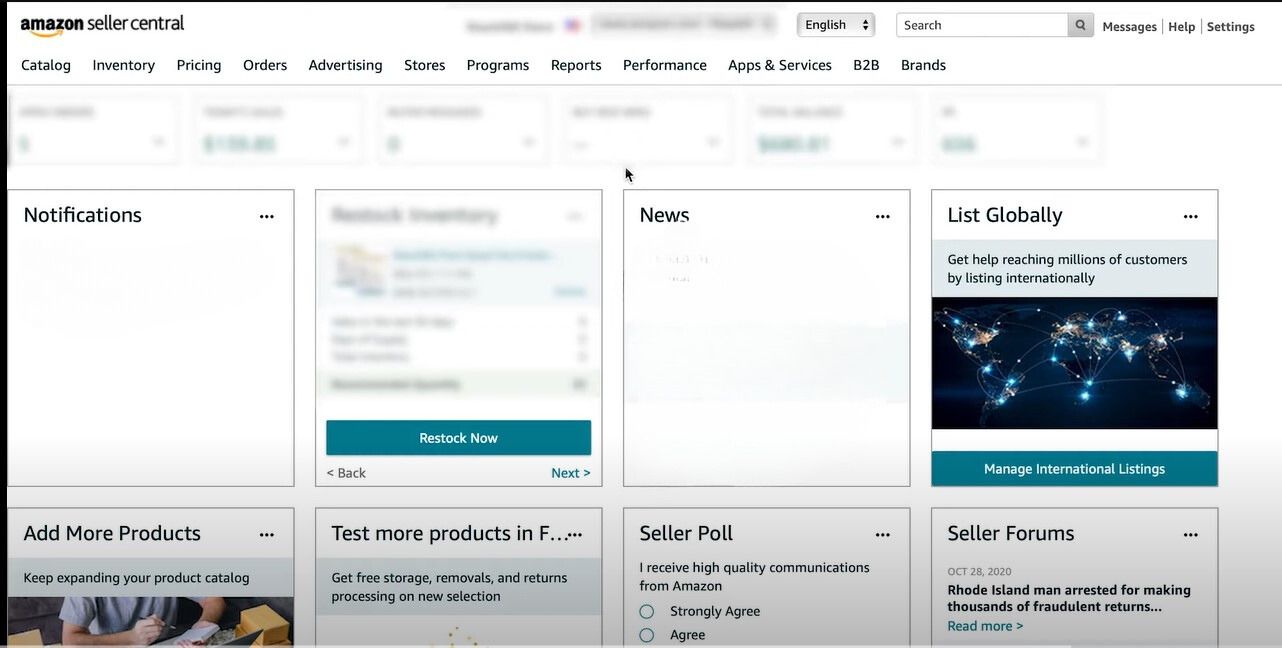
- Log in to your Amazon Seller Central account.
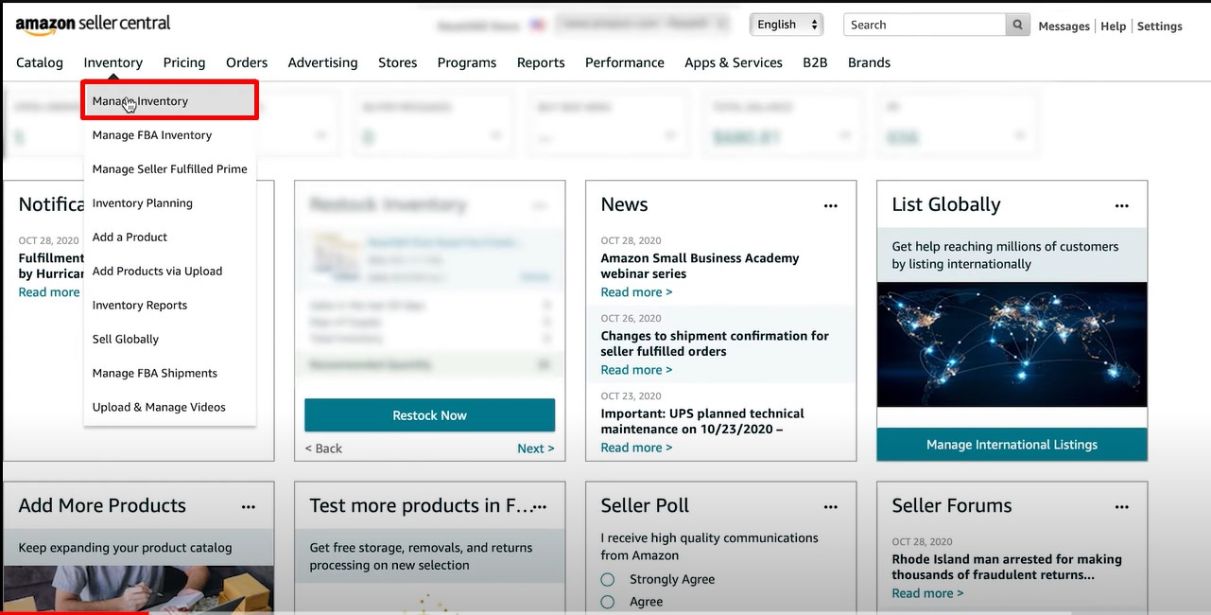
- Go to the “Inventory” tab and select “Manage Inventory.”
- Locate the product listing you want to edit or create a new listing.
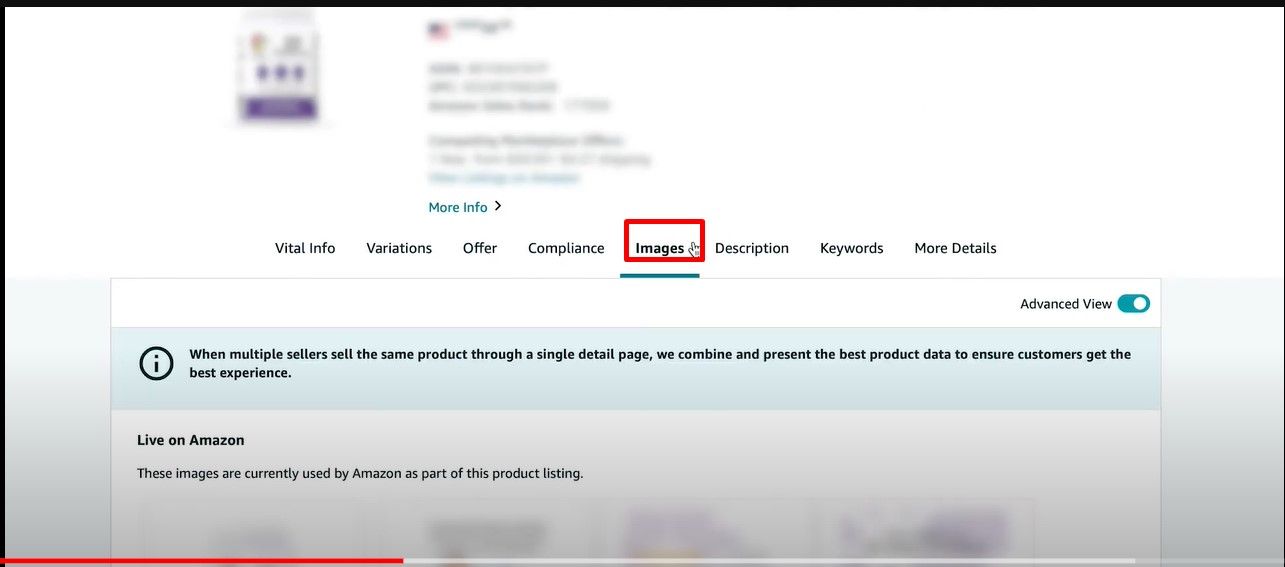
- In the “Images” section, you can add images for your product.
Optimizing Images for Amazon Listings:
Optimized images are more likely to attract potential buyers and enhance your product’s visibility. Here are some tips for optimizing product images on Amazon:
- Use High-Quality Images: Make sure that your images are of high resolution, well-lit, and clear. Amazon recommends a minimum of 1000 pixels on one side for zoomable images.
- Background: The main image should have a clean, white background. For additional images, you can use complementary backgrounds that enhance the product’s appeal without being distracting.
- Main Image: The main image should showcase the product as the customer would receive it. It should be the product against a white background, and it must not include additional objects or text.
- Secondary Images: Use secondary images to provide different angles, close-ups, and lifestyle shots that help customers understand the product better.
- Image Consistency: Maintain consistency in image size, aspect ratio, and background color throughout your product images.
- Image Compression: Compress your images to reduce file size while maintaining quality. This can help improve page loading speed.
- File Format: Save your images in common formats like JPEG, PNG, or TIFF.
Best Practices for Organizing and Labeling Product Images:
Proper organization and labeling of your product images are essential for efficient management and presentation. Follow these best practices:
- Descriptive Filenames: Name your image files descriptively to easily identify the product they represent. For example, “brand-productname-color-angle.jpg.”
- Image Order: Organize your images logically. The primary image with a white background should be the first one, followed by secondary images showcasing different angles and features.
- Consistent Style: Maintain a consistent style and format for all your product images, ensuring they align with your brand’s visual identity.
- Image Sets: Group related images into sets. For example, you can create sets for lifestyle images, close-ups, or images showcasing product variations.
- Save Backups: Keep backup copies of your original, unedited images in case you need to make future changes.
- Keep It Neat: Avoid cluttering your product images with watermarks, text, or graphics that don’t add value.
- Optimize for Mobile: Remember that many customers shop on Amazon using mobile devices, so ensure your images are optimized for smaller screens.
- Utilize Amazon Image Upload Tools: Amazon provides tools for bulk image uploads and management, making it easier to update product listings with multiple images.
Why Amazon Product Photography Is So Important
Product photography on Amazon is a crucial element of your online business strategy. It goes beyond merely showcasing your products; it directly impacts your brand’s perception, influences customer trust, and significantly influences buying decisions. Here’s why Amazon product photography is crucial:
The Connection Between Image Quality and Brand Perception
The quality of your product images directly reflects on your brand. Here’s how:
First Impressions Matter
Often, a potential customer’s initial interaction with your brand comes through your product images. High-quality, professional images create a positive first impression, conveying that your brand is reputable, trustworthy, and committed to quality.
Perceived Value
Well-photographed products appear more valuable. When customers see clear, well-lit images, they’re more likely to attribute higher quality and value to the products, allowing you to potentially command higher prices.
Consistency
Consistent image quality across all your products builds brand consistency, which is essential for recognition and trust.
Differentiation
In a crowded marketplace like Amazon, exceptional images set your brand apart from competitors. They can grab the attention of shoppers browsing through similar products and compel them to explore your listings further.
Impact on Customer Trust and Confidence
Product images significantly influence customer trust and confidence in the following ways:
Transparency and Authenticity
Clear, detailed images provide transparency and authenticity. Customers can see exactly what they’re buying, reducing the risk of disappointment upon delivery. This transparency builds trust.
Reduced Returns
When customers trust that the product matches the images, return rates decrease. Fewer returns lead to cost savings and improved customer satisfaction.
Professionalism
Professional product images convey professionalism and attention to detail. This professionalism extends to your brand, making customers more comfortable doing business with you.
Brand Reputation
High-quality images create a positive customer experience, which contributes to your brand’s reputation. Customers who are happy with your products are much more likely to recommend them to others and write positive reviews.
How Product Photos Influence Customer Buying Decisions
Product images play a pivotal role in customer buying decisions:
Visual Appeal
Well-presented products are visually appealing and draw customers in. Aesthetic and inviting images capture attention, making potential buyers more likely to explore your product in detail.
Information Delivery
Images provide essential information about the product’s appearance, features, and use. Customers often rely on images to understand the product quickly and make an informed decision.
Emotional Connection
Lifestyle images, when used effectively, help customers to develop an emotional connection with the product. Shoppers can envision how the item fits into their own lives, creating desire and motivation to purchase.
Comparison and Evaluation
Customers often compare products visually. Detailed images and close-ups allow them to evaluate different options and choose the product that best meets their needs.
Final Decision Point
The images are often the last point of contact before the “Add to Cart” button. Compelling images can tip the balance, convincing potential buyers to make a purchase.
Should You Hire a Professional Product Photographer?
When it comes to product photography for your business, deciding whether to hire a professional photographer or undertake the task yourself is a critical choice. In this section, we’ll explore the pros and cons of hiring a professional photographer, key factors to consider when making your decision, how to find and collaborate with a professional, and budget considerations.
Pros and Cons of Hiring a Professional Photographer:
Pros of Hiring a Professional Photographer:
- Expertise: Professional photographers have the knowledge, skills, and experience to capture high-quality product images that align with industry standards.
- Time Efficiency: Hiring a professional photographer frees up your time to focus on other aspects of your business, such as product marketing, development, and customer service.
- Consistency: Professionals ensure that your product images are consistent in terms of quality, style and brand identity, which is crucial for building brand recognition.
- Quality Equipment: Professional photographers have access to top-notch camera equipment, lighting, and editing software, resulting in better images.
- Creative Direction: They can provide creative input and suggestions to make your product images stand out.
Cons of Hiring a Professional Photographer
- Cost: Professional photography services can be expensive, which may strain your budget, particularly if you have a large number of products.
- Scheduling: Coordinating with a photographer’s schedule can sometimes be challenging, causing delays in your product listing updates.
Factors to Consider When Deciding Between DIY and Professional Photography
When deciding between DIY and professional photography, consider the following factors:
- Budget: Analyze your budget and determine how much you can allocate to photography. Consider the return on investment (ROI) that high-quality images can bring.
- Quantity: The number of products you have may influence your decision. If you have a few products, you might opt for professional photography, while DIY could be more cost-effective for a smaller inventory.
- Time: Consider your available time and whether you can dedicate it to learning photography, setting up a home studio, and editing images.
- Experience: Your level of photography experience plays a significant role. If you have the skills and equipment, DIY may be a viable option.
- Brand Image: Evaluate the importance of brand consistency and image quality in your industry. High-end products may require professional images for credibility.
- Competitiveness: Research your competitors’ product listings. If they have professional images, you may need them to stay competitive.
Finding and Working with a Professional Product Photographer
To find and collaborate with a professional product photographer:
- Search Online: Look for photographers in your area or those who specialize in product photography. Websites, directories, and social media platforms are valuable resources.
- Portfolio Review: Examine the photographer’s portfolio to ensure their style aligns with your brand.
- Discuss Your Needs: Contact potential photographers and discuss your project’s requirements, expectations, and budget.
- Set Clear Terms: Define the scope of work, deadlines, and pricing in a formal agreement or contract.
Budget Considerations for Hiring a Photographer
When budgeting for a professional photographer:
- Get quotes from multiple photographers to compare pricing.
- Consider the value and ROI that professional images will bring to your business.
- Allocate a budget that allows for a balance between quality and cost-effectiveness.
- Be transparent with the photographer about your budget constraints to find a solution that works for both parties.
Conclusion
Amazon product photography is a cornerstone of success in the competitive world of e-commerce. High-quality images not only provide customers with a visual representation of your products but also serve as a direct reflection of your brand’s reputation. They build trust, enhance perceived value, and play a pivotal role in influencing customer buying decisions. The investment in professional product photography, when aligned with Amazon’s guidelines and your brand’s goals, can yield significant returns by improving conversion rates, reducing returns, and setting your products apart in a crowded marketplace.
Whether you choose the DIY route or hire a professional photographer, the decision should be rooted in a careful assessment of your budget, product volume, and brand image. Regardless of the approach you take, it’s essential to maintain a commitment to image quality and consistency. Ultimately, well-executed Amazon product photography is a strategic investment that can empower your brand and drive success in the ever-evolving landscape of online retail.
The post Amazon Product Photography: Elevate Your Listings with Stunning Visuals appeared first on Amazon-ASIN Blogs - Latest from Amazon Sellers: News, Advice, and Effective Strategies.
]]>The post The Ultimate Guide to Amazon Backend Keywords: Boost Your Product Visibility appeared first on Amazon-ASIN Blogs - Latest from Amazon Sellers: News, Advice, and Effective Strategies.
]]>To master Amazon SEO, you need to understand not only the basics of optimizing your product listing but also the often-overlooked realm of backend keywords. These hidden gems play a vital role in helping your products stand out in the crowded Amazon marketplace.
Quick Guide:
- What Are Amazon Backend Keywords?
- The Role of Backend Keywords in Amazon SEO
- Why Are Amazon Backend Keywords Important?
- How to Add Backend Keywords to Amazon Listing
- How to Find the Right Amazon Backend Keywords for Your Listing
- Conclusion
What Are Amazon Backend Keywords?
Backend keywords, as the name suggests, are a set of keywords or search terms that are not visible to customers on your Amazon product listing. These keywords are entered into the backend of your product listing, and they serve a specific purpose – to help Amazon’s search algorithm understand the nature and relevance of your product. In essence, they are metadata that aid in product discoverability.
These keywords are a critical component of Amazon SEO because they allow you to provide additional context about your product, making it more likely to appear in relevant search results. When a customer searches for a product, Amazon’s search engine takes these backend keywords into account, alongside the frontend keywords (the ones that customers see), to determine which products to display in the search results.
Differentiating backend keywords from frontend keywords
It’s important to distinguish between backend and frontend keywords. Frontend keywords are the ones you visibly incorporate into your product title, bullet points, and product description. These are the keywords that potential customers see when they browse your product listing.
Backend keywords, on the other hand, are not visible to customers. They are for Amazon’s internal use, enabling the platform to categorize and index your product accurately. This hidden aspect of backend keywords makes them a powerful tool for influencing your product’s search performance.
While character count limits frontend keywords and must be thoughtfully integrated into your product listing’s content, backend keywords offer more flexibility. They can include synonyms, misspellings, and other relevant terms that might not fit naturally in your product description.
Highlighting the hidden potential of backend keywords
The true power of backend keywords lies in their hidden nature. Since customers cannot see them, backend keywords allow you to add an extra layer of relevance to your product listing. When used strategically, they can help your product rank higher in search results, increasing its chances of being discovered by potential buyers.
Think of backend keywords as your secret weapon in the battle for Amazon’s top search positions. They enable you to target a wider range of search queries, encompassing variations and alternative phrasings that customers might use when searching for a product like yours. By leveraging this hidden potential, you can tap into a broader audience and outperform competitors who might overlook the importance of backend keyword optimization.
The Role of Backend Keywords in Amazon SEO
The connection between keywords and search ranking
To truly grasp the role of backend keywords in Amazon SEO, it’s essential to understand the fundamental connection between keywords and search ranking. Amazon’s search algorithm relies on keywords to match customer search queries with relevant products. The more relevant and accurate the keywords, the higher the chances of your product appearing in top search results.
Backend keywords are an integral part of this process. When you include them in your product listing, you provide Amazon’s algorithm with essential information about your product. This, in turn, helps Amazon place your product in search results that closely match what you offer.
For example, if you’re selling organic cotton t-shirts, you might include backend keywords like “sustainable,” “eco-friendly,” and “comfortable fabric.” These terms signal to Amazon that your product aligns with these customer preferences, increasing the likelihood of your t-shirts being displayed to shoppers interested in those attributes.
How backend keywords influence product discoverability
Backend keywords significantly impact your product’s discoverability. When a potential customer searches Amazon, the platform scans through its vast database of product listings to identify the most relevant items. This process involves matching customer search queries to product keywords.
By optimizing your backend keywords with precision and relevance, you increase the chances of your product appearing in more search results. This extended reach exposes your product to a broader audience, increasing the likelihood of attracting potential buyers.
Consider this scenario: A customer searches for “organic baby clothes,” and your product listing includes the relevant backend keywords. Even if your product primarily appears under searches for “organic baby onesies,” your backend keywords ensure it shows up for the broader query, improving your chances of making a sale.
Why Are Amazon Backend Keywords Important?
Emphasizing the competitive nature of Amazon
Amazon is a fiercely competitive marketplace, and staying ahead of the competition is a constant challenge for sellers. To succeed on this platform, you must recognize that every advantage matters. This is where backend keywords come into play.
In a marketplace flooded with millions of products, ranking well in search results can make or break your business. Your competitors are likely optimizing their listings to the best of their abilities, and if you’re not doing the same, you risk being overshadowed by more savvy sellers. Backend keywords provide you with a competitive edge because they allow you to tap into a vast array of relevant search queries, increasing your visibility.
If you want to stand out and thrive on Amazon, you can’t afford to overlook the importance of backend keywords in your overall SEO strategy.
How frontend keywords alone fall short
While front-end keywords are crucial for attracting customers and making your product listings informative and compelling, relying solely on them falls short in the complex world of Amazon SEO.
Character limits often constrain frontend keywords and must be seamlessly integrated into your product listing’s content. This can sometimes limit your ability to target a wide range of search queries effectively. Additionally, front-end keywords are highly visible to customers, so you must balance the need for SEO with creating a user-friendly and engaging product page.
Backend keywords, on the other hand, provide a flexible and discreet solution. They allow you to include a broader set of keywords that might not fit naturally in your front-end content. By expanding your reach with these hidden keywords, you can capture the attention of customers who use various search terms to find products like yours.
How to Add Backend Keywords to Amazon Listing
Step-by-step guide to adding backend search terms on Amazon
Optimizing Amazon backend search terms is a relatively straightforward process, but it requires attention to detail. Here’s a step-by-step guide to adding backend keywords to your Amazon product listing:
- Log in to your Amazon Seller Central account: Your journey begins by logging into your Amazon Seller Central account, which serves as your control center for managing your listings and products.
- Access the ‘Manage Inventory’ page: Under the ‘Inventory’ drop-down menu, you’ll find the option to ‘Manage Inventory.’ Click on it to access the list of products you currently have listed on Amazon.
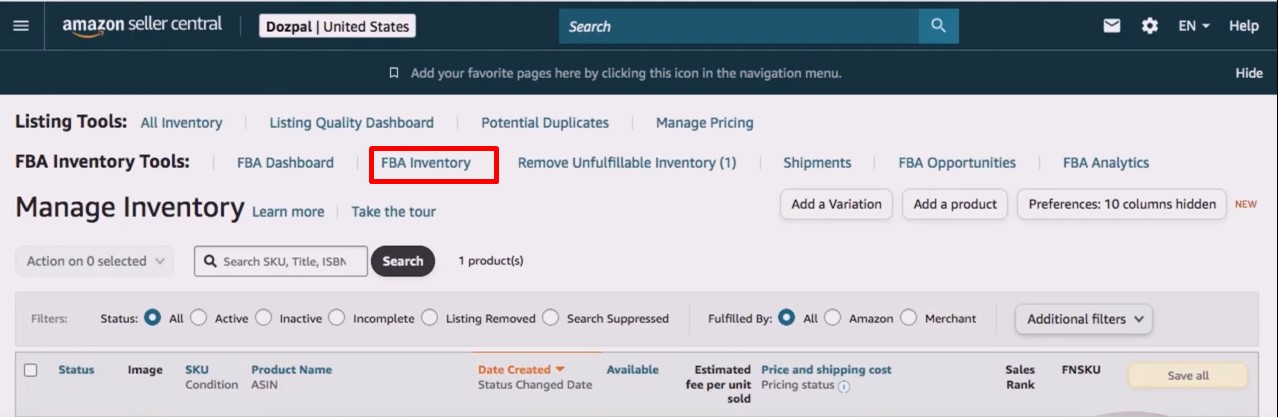
- Find the listing where you want to add backend keywords: Within the ‘Manage Inventory’ page, locate the specific product listing for which you wish to optimize your backend keywords. Once you’ve identified it, click on the ‘Edit’ button associated with that listing. You will be redirected to a new page dedicated to that particular product.
- Select the ‘Keywords’ tab: On the product editing page, navigate to the ‘Keywords’ tab. This is where you can input your carefully chosen backend keywords.

- Enter your backend keywords: In the ‘Search Terms’ field, input your selected backend keywords. Be sure to separate each keyword or keyphrase with commas for clarity. Make the most of your character limit by being concise and prioritizing the most relevant terms.
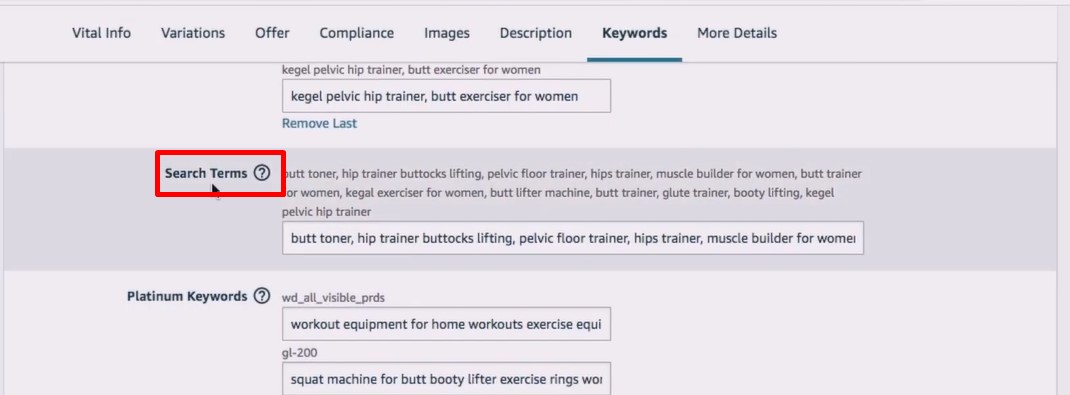
- Save your changes: After entering your backend keywords, click on the ‘Save and finish’ button to ensure that your keyword changes are saved and applied to your product listing.
The importance of following Amazon’s guidelines
It’s crucial to emphasize that Amazon has specific guidelines and rules for backend keywords. Failing to adhere to these Amazon backend search terms guidelines can result in your product listings being penalized or removed. To effectively use backend keywords, you should:
- Avoid Prohibited Content: Do not use offensive, misleading, or prohibited content in your backend keywords. This includes using competitor brand names or making false claims.
- Respect Character Limits: Stick to Amazon’s character limit for backend keywords. At the time of writing, Amazon allows up to 249 bytes of backend keyword text for most categories. This is subject to change, so always check for the most up-to-date information.
- No Repeated Words: Do not repeat any words that are already in your frontend content or title. Amazon automatically indexes those keywords.
- No Punctuation Marks: Avoid using punctuation marks or special characters in your backend keywords.
- Stay Relevant: Ensure your backend keywords are directly relevant to your product. Misleading or irrelevant keywords can harm your listing’s performance.
- Monitor Amazon’s Updates: Amazon’s rules and guidelines may change over time, so it’s essential to stay informed and adapt your backend keyword strategy accordingly.
Tips for optimizing backend keywords effectively
Here are some additional tips to optimize your backend keywords effectively:
- Keyword Research: Conduct thorough keyword research to identify the most relevant and high-traffic search terms in your niche.
- Prioritize Relevance: Focus on the most relevant keywords that accurately describe your product. Quality over quantity is key.
- Regular Updates: Keep your backend keywords up-to-date to reflect changes in market trends, customer behavior, and competitor strategies.
- Competitor Analysis: Analyze the backend keywords of successful competitors to gain insights into effective keyword usage.
- Use Tools: Consider using Amazon keyword research tools to identify valuable backend keywords and track your performance.
How to Find the Right Amazon Backend Keywords for Your Listing
Tools and methods for keyword research
Effective backend keyword optimization begins with thorough keyword research. Several tools and methods can help you identify the most suitable backend keywords for your Amazon listing:
- Amazon’s Search Bar: Start with Amazon’s search bar. Begin typing a word or phrase related to your product, and you’ll see auto-suggestions. These suggestions can provide insights into what customers are searching for.
- Keyword Research Tools: Utilize keyword research tools like SellerApp or MerchantWords. These tools can help you discover high-traffic keywords and variations specific to your niche.
- Amazon PPC Campaigns: Running Amazon Pay-Per-Click (PPC) campaigns can provide valuable data on which keywords generate clicks and sales. Use this information to refine your backend keyword strategy.
- Customer Reviews: Analyze the reviews of similar products to identify keywords that customers commonly use when describing or searching for products like yours.
- Competitor Keywords: Look at your competitors’ product listings to identify the keywords they are using in their backend. This can provide insights into what works in your niche.
Identifying relevant long-tail keywords
Long-tail keywords, which are more specific and extended search phrases, can be particularly effective in targeting a niche audience. To identify relevant long-tail backend keywords:
- Use Keyword Research Tools: Many keyword research tools can help you uncover long-tail keywords that customers frequently search for. These may have a lower search volume but can yield more targeted traffic.
- Answer Customer Questions: Think about the questions customers might have about your product and use these as long-tail keywords. For example, if you sell camping gear, “best lightweight camping tent for two” could be a valuable long-tail keyword.
- Incorporate Product Features: Highlight unique features of your product as long-tail keywords. If your product is a water-resistant Bluetooth speaker, “waterproof portable speaker” could be a relevant long-tail keyword.
Competitor analysis for keyword inspiration
Analyzing your competitors’ strategies can provide valuable insights and inspiration for your backend keywords:
- Identify Top Competitors: Start by identifying your top competitors in your niche. These are the sellers whose strategies you want to study.
- Analyze Their Listings: Carefully review their product listings, including their frontend and backend keywords. Look for patterns and common themes in their keyword usage.
- Assess Customer Reviews: Check the customer reviews of your competitors’ products. Pay attention to phrases and terms that customers commonly mention, as these could be effective backend keywords.
- Monitor Changes: Continuously monitor your competitors’ listings and updates. They might adjust their backend keywords in response to market changes or trends.
- Adapt, Don’t Copy: While competitor analysis is valuable, remember that it’s essential to create your unique backend keyword strategy. Adapt their successful techniques to your products rather than directly copying them.
Conclusion
In the ever-competitive world of Amazon, backend keywords serve as a potent tool for improving your product listings’ visibility and attracting the right customers. By conducting thorough keyword research, including relevant long-tail keywords, and drawing inspiration from competitor strategies, you can craft a powerful backend keyword strategy that sets you apart from the competition.
Remember, Amazon’s search landscape is dynamic, and customer preferences evolve. Therefore, it’s crucial to continually refine and update your backend keyword strategy to stay relevant and maximize your product’s discoverability. With dedication and a well-executed backend keyword plan, you can enhance your Amazon SEO, improve your search rankings, and ultimately drive more sales on the platform.
The post The Ultimate Guide to Amazon Backend Keywords: Boost Your Product Visibility appeared first on Amazon-ASIN Blogs - Latest from Amazon Sellers: News, Advice, and Effective Strategies.
]]>The post How to Find Quality Link-Building Opportunities for Your Amazon Listings? appeared first on Amazon-ASIN Blogs - Latest from Amazon Sellers: News, Advice, and Effective Strategies.
]]>With millions of sellers active on the site, catching the attention of customers gets harder. If you want to stand above the pack, you will have to do something drastically different from everyone else. This is where finding quality link-building opportunities can become a vital part of your business strategy. In this post, we have outlined how to begin and what to expect.
Why is Link Building Important for Optimization of Your Amazon Listings?
Unlike regular blogs, you have limited control over your Amazon on-page SEO. And there’s really no more sustainable way to get around the competition than using search engine optimization tactics. Otherwise, how can you stand out from hundreds of similar brands selling the same kind of products, some of them at even cheaper prices? If you already know the importance of backlinks in getting your website to a better search ranking position, you might be wondering if the same principles apply to your Amazon listings.
Well, turns out that strategic and quality links from relevant sources can have a huge impact on your Amazon listings. Yes, including the visibility boost and more visitors. You can increase your sales rates or attract and retain more customers by having a few inbound links from relevant web pages. This is why many sellers set up an account on reputable online directories that can help them buy guest posts in related niches where the backlink placement will appear more natural.
Link Building Opportunities: How to Improve Your Ranking Effectively
One of the major benefits of using links to boost your ranking on Amazon and across the web is the ripple effect it creates. How this positive feedback loop works is that the more visibility you gain, the more opportunities you get to make more sales, which means more reviews and even more visibility, and so on. Yet, not every link will give you this kind of result. Here’s how you can find the right kind of link-building opportunities that will drive these kinds of outcomes.
#1 Get Inspiration From Your Competitors’ Backlink Profile
This is a very common technique for savvy Amazon sellers to find viable opportunities without doing too much work. But there is a technique to this. You should look at who the highest-ranking competitors in your niche are, then check out their backlinks profile. What you want to do is to discover which web pages or sites are linking to them. You will likely find that there are tons of pages that link back to them, but Voy Media recommends that you focus on those with high traffic, good domain authority scores, and low spam scores.
If the website is also ranking high in a related competitive niche, that could be a sign that a backlink from them will be valuable. Reach out to them and present your well-thought-out offer (some freshly updated content, interesting research or stats, etc.). If your proposal is good, you can get a link placement to your Amazon listing in exchange.
#2 Don’t Forget About the Good-Old Guest Posting
This is slightly similar to the first, but instead of doing competitor backlink analysis, you have to spread a wider net. You can scour social media, use Google search, or check out the truly big brands in your niche that provide related products or services. Once you find viable prospects, you will have to reach out to them and convince them to publish one of your content pieces on their web page. In exchange for your well-researched piece, they can then include a backlink to your product listing. Remember to use natural anchor tags that fit the context of the article, and ensure your link offers some added value.
#3 Join the Amazon Associate Program
Signing up for the Amazon Associate program can be a good link-building opportunity, especially if your product has a wide market reach or is quite popular. As more bloggers and other content creators write about your offering, they will have to include links to them, which will direct more traffic to your page. You get to improve your visibility and make more sales as a result. Just ensure that you understand and follow Amazon’s policies so you can enjoy the full benefits that come with the program.
#4 Run a Podcast and a Blog
This one is not for everyone unless you have the time and are willing to make that long-term commitment. Still, creating a blog site where you provide more detailed, helpful updates about your products, including niche news, product launch updates, and troubleshooting ideas, can be a good way to attract links to your Amazon listing. You can even use a digital whiteboard to teach and share ideas through Canva’s collaborative space perfect for mapping out blog topics, content strategies, or podcast episode themes before publishing. Remember that there are only so many links you can plug into your page, so don’t overdo it. The goal is to end up with a thriving online community that will talk about your product, share it, and generally help you expand your reach. The same goes for podcasts.
You can invite manufacturers or product experts to discuss features, ideas about the next innovations or updates, etc. People love to share their interests and hobbies. By creating blogs, forums, or any other online community, you are helping them relate more to and form a lasting relationship with your brand. This, in turn, boosts your visibility, which means more opportunities for backlinks.
#5 Consider Using Web Directories
While slightly more expensive, this offers the fastest results for improving your ranking while also saving you more time and effort. By setting up an account on a credible web directory, you increase your chance of being seen by potential customers and other business owners who may want to link to you in the future. Still, try to be very careful and do thorough research before choosing this option. Picking the wrong platform could land you, or more accurately, your product listing, in a bad place with the algorithm blacklisting it and making it almost impossible for people to find you through organic searches.
Challenges of Doing SEO for Amazon Products
You already know that your best chance to break your sales record is by incorporating SEO for Amazon products. But doing this also comes with its own challenges. Here are some of the more common ones:
- Too much competition. According to the reports, there are about 2,000 sellers joining the platform every day. This means that no matter how obscure your product niche is, you’ll probably have at least a few dozen people all vying for the same target audience as you. Also, no matter how good you are at SEO, more competition means that you will have to constantly be at the top of your game to avoid being pushed to the background.
- Complicated Algorithm. The Amazon algorithm has its unique quirks, which can make it difficult for sellers to get instant results from their SEO efforts. Throw in constant updates, and it becomes easy to lose track. Still, by learning how to optimize your product listings effectively, you’ll be able to notice improvement and, in time, hit your targets.
- Slightly longer learning curve. Often, sellers focus on keywords, better pricing offers, and quick response time as their strategy. But you’ll need to go beyond the surface if you really want to outrank others, which is why link-building is so important. However, you’ll find that it will take some time to figure out the other aspects of search engine optimization techniques that can help you. If you are not willing to do it yourself, you can always get some professional help. Still, first, learn how to choose the best Amazon SEO agency, which can be a bit tricky.
- Finding the right balance between search-friendly keywords and customer-centric keywords. Believe it or not, sometimes you will find that there is a risk of leaning too much towards one side to the detriment of the other. For example, you might focus on optimizing your content for the algorithm and end up skipping some relevant information that could nudge more people to make a purchase.
- Minimizing negative reviews. Reviews can and do affect your Amazon SEO efforts, so you’ll need to keep them at the barest minimum or avoid them altogether (mission impossible). So before you invest in SEO for Amazon product listings, you want to ensure that you have established a good relationship with your cursor and have built a reputation for quality service.
Best Practices and Tips to Boost Your Amazon SEO Strategy
Learning how to leverage SEO for a new project is especially challenging, but it doesn’t always get easier for the old and established products. Here are some ideas to help you boost your Amazon SEO strategy, whether you are just starting or have been selling the same thing for years.
- Relevant long-tail and short-tail keywords are essential. Using both relevant long- and short-tail keywords helps the algorithm understand what your products are and how to rank them accordingly. Use them in your product title, image tags (where applicable), product description, etc. In return, when people type the keywords into the search box, your product listing also appears alongside the other brands.
- Use relevant, clear & quality images. Your images are there to help you rank better and attract more sales. You want to avoid any visuals that don’t accurately depict what the product looks like, as this can attract negative reviews from angry customers and tank your rankings.
- Pay special attention to your product listing page. You want to optimize this and provide helpful information that potential customers will need to understand the features of your offering. Keep it concise and clear. Additionally, you can use bullet points to highlight the major features.
- Try partnering with relevant influencers or link-building agencies. The more inbound links to your product listings, the better your visibility and rankings will be, so use this to your advantage.
- Offer better prices. Everyone loves getting a bargain and feeling like they have saved some extra cash. So, you can sell the same product slightly cheaper than your competitors to entice more customers. But beware, if it’s too low, people might think there’s something wrong with your offering, and you could end up losing money too.
- Promotions and special discounts for bulk purchases. Use this to attract more traffic. You can also throw in a free shipping deal if possible.
- Encourage buyers to drop reviews and respond when they do. Since client opinions affect your ranking, you want to get as many customers as possible to leave their comments and ratings. Be sure to respond to them, as this will boost engagement.
- Outsource your SEO when possible. To be honest, not every seller will have the time to learn all the intricacies of search engine optimization techniques and best practices. So, if this is you, you should consider outsourcing it. This will help you focus on other business-critical aspects, like building good customer relationships, ensuring stocks are always high, etc. Just be sure to use a reputable partner to reap the benefits.
- Monitor your Amazon rankings. This will help you notice a drop early and address that on time to avoid making losses.
The post How to Find Quality Link-Building Opportunities for Your Amazon Listings? appeared first on Amazon-ASIN Blogs - Latest from Amazon Sellers: News, Advice, and Effective Strategies.
]]>The post Understanding Amazon Restricted Products Policy: A Guide for Sellers appeared first on Amazon-ASIN Blogs - Latest from Amazon Sellers: News, Advice, and Effective Strategies.
]]>Quick guide
- Brief Explanation of Amazon Restricted Products Policy
- Importance of Understanding Restricted Products for Sellers
- Restricted Products and Prohibited Items
- Amazon Guidelines and Regulations
- Different Categories of Amazon Restricted Products List
- Amazon Restricted Products Policy Implementation and Reasons
- Tips for Sellers to Avoid Listing Products in Restricted Categories Accidentally
- Is It Worth Selling Restricted Categories on Amazon?
- Identifying Restricted Products
- Steps to Avoid Selling Restricted Products on Amazon
- Steps to Appeal If Your Product Has Been Wrongly Classified as Restricted
- Prohibited Actions and Consequences
- Best Practices for Sellers
- Tips for Amazon FBA Sellers
- Conclusion
Brief Explanation of Amazon Restricted Products Policy
The Restricted Products policy is an integral part of Amazon’s overall efforts to ensure that the products sold on its platform are safe, compliant with relevant regulations, and align with Amazon values. The policy encompasses a broad range of items that are either prohibited or require specific permissions or documentation to be sold. Amazon constantly updates this list to accommodate changes in legislation, industry standards, and evolving customer expectations.
The list of restricted products includes but is not limited to, certain types of weapons, hazardous materials, prescription medications, copyrighted material, and products that infringe upon intellectual property rights. Additionally, it encompasses goods that may have safety concerns, age restrictions, or environmental implications. For instance, Amazon restricts the sale of certain electronics that do not meet safety standards and products containing specific chemicals harmful to the environment.
Importance of Understanding Restricted Products for Sellers
As an Amazon seller, comprehending and adhering to the Restricted Products policy is crucial for various reasons
Avoid Penalties and Account Suspension
Failing to comply with the Restricted Products policy can lead to severe consequences, including the suspension or closure of the seller’s account. Amazon’s zero-tolerance approach toward policy violations underscores the importance of diligent adherence.
Protecting Consumer Trust
Amazon commitment to customer safety and satisfaction means that it diligently curates the products available on its platform. By adhering to the policy, sellers contribute to maintaining a trustworthy shopping experience for Amazon’s vast customer base.
Ensuring Legal Compliance
Many restricted products are regulated by local, national, or international laws. Sellers must conduct due diligence to understand the legal requirements surrounding the sale of certain products, ensuring they obtain any necessary permits or licenses before listing them on Amazon.
Enhanced Brand Reputation
Sellers who consistently comply with Amazon’s policies are likely to build a positive brand reputation and gain customer loyalty. Customers appreciate knowing they can purchase from reputable sellers prioritizing safety and compliance.
Avoiding Product Liability Issues
Selling restricted products can expose sellers to potential product liability claims, especially if the items pose risks or harm to customers. Compliance with the policy helps mitigate such risks and safeguards sellers against legal liabilities.
Streamlining Business Operations
Understanding the Restricted Products policy from the outset saves sellers from wasting time and resources on products that cannot be sold on Amazon. This knowledge enables them to focus on viable and profitable product lines.
Restricted Products and Prohibited Items
Restricted products can be sold on Amazon but are subject to specific regulations, requirements, or permissions. Sellers are allowed to list these products, but they must adhere to the policy’s guidelines to ensure compliance with applicable laws and safety standards. In contrast, prohibited items are strictly forbidden from being listed or sold on Amazon, regardless of any circumstance.
Amazon Guidelines and Regulations
Amazon’s Restricted Products policy is designed to protect customers, sellers, and the integrity of the marketplace. By enforcing this policy, Amazon aims to prevent the sale of unsafe, illegal, or harmful products. The policy is subject to frequent updates to reflect changes in regulations, industry standards, and customer expectations. Therefore, it is crucial for sellers to stay updated with the latest revisions to remain in compliance.
To ensure adherence, sellers must conduct due diligence before listing any products on Amazon. This involves understanding relevant laws, regulations, and policies governing the sale of specific items, obtaining necessary permits or licenses, and providing accurate product information.
Failure to comply with the policy can lead to severe consequences, such as account suspension or closure. Amazon employs a zero-tolerance approach toward policy violations, emphasizing the significance of strict compliance.
Different Categories of Amazon Restricted Products List
Hazardous Materials
This category includes items that pose potential risks to health, safety, or the environment. It encompasses flammable, corrosive, explosive, or toxic substances. Examples of restricted hazardous materials include certain types of batteries, aerosol sprays, and chemicals.
Intellectual Property Infringement
Amazon places significant importance on protecting intellectual property rights. Therefore, products that violate copyrights, trademarks, patents, or any other intellectual property are strictly prohibited. Sellers must ensure that the products they list do not infringe on any third-party rights.
Weapons and Ammunition
The sale of firearms, ammunition, explosives, and certain accessories is heavily regulated on Amazon. Sellers must comply with federal, state, and local laws when dealing with these products.
Medical and Healthcare Products
Certain medical devices, medications, and healthcare products require specific permissions or certifications to be sold on Amazon. Sellers must verify the necessary qualifications and approvals before listing such items.
If you dropship medical products or manage multiple channels, consider using tools for dropshipping medical supplies that sync compliant catalogs, map FDA/CE attributes, flag Rx-only items, and auto-block restricted SKUs per marketplace. These solutions centralize supplier documentation (e.g., 510(k), SDS), track lot/expiry, and help route orders only to authorized suppliers—reducing the risk of accidental policy violations.
Endangered Species and Wildlife Products
The sale of products derived from endangered or protected species, such as ivory, is strictly prohibited. This restriction aims to combat illegal wildlife trade and preserve biodiversity.
Age-Restricted Products
Products intended for adult use, such as alcohol, tobacco, and adult content, have strict age restrictions. Sellers must verify the age of customers for these products and adhere to relevant laws.
Currency and Stamps
The sale of counterfeit currency, coins, or stamps is prohibited on Amazon. Genuine collectible currency and stamps may be sold but with strict adherence to guidelines.
Recalled Products
Listing recalled items is strictly prohibited, as they pose potential risks to consumers. Sellers must ensure they are not offering recalled products for sale.
Amazon’s Restricted Products Policy Implementation and Reasons
Amazon’s Restricted Products policy plays a crucial role in maintaining a safe, trustworthy, and compliant marketplace. The implementation of this policy is driven by several important reasons, all aimed at safeguarding the interests of customers, sellers, and the platform as a whole.
Safety and Legal Considerations
The primary reason for restricting certain products on Amazon is to ensure the safety and well-being of customers. Products that pose potential risks to health, safety, or the environment are carefully regulated to prevent harm to consumers. Hazardous materials, for example, could lead to accidents or environmental damage if not handled properly. By restricting their sale, Amazon prioritizes the safety of its customers.
Moreover, selling items that do not meet safety standards or are not compliant with industry regulations can result in product defects, leading to injuries or accidents. Restricting such products helps prevent potential liabilities for both sellers and Amazon.
Protecting the Reputation of Amazon and Its Sellers
Maintaining a positive reputation is critical for Amazon continued success. A marketplace known for offering high-quality products from reputable sellers fosters customer trust and loyalty. Allowing the sale of products that are unsafe or illegal would tarnish Amazon’s image and could lead to customers losing faith in the platform.
By enforcing the Restricted Products policy, Amazon demonstrates its commitment to providing a reliable and secure shopping experience. This dedication to protecting customers contributes to building a strong brand reputation and attracting more shoppers to the platform.
Compliance with Domestic and International Laws and Regulations
As a global marketplace, Amazon operates in multiple countries with varying regulations and laws. Adhering to these legal requirements is not only essential for Amazon’s legal standing but also for sellers who must comply with the laws of the regions they serve. By restricting products that may be illegal or non-compliant in specific jurisdictions, Amazon ensures that sellers operate within the boundaries of the law.
Tips for Sellers to Avoid Listing Products in Restricted Categories Accidentally
Familiarize Yourself
Familiarize yourself with Amazon’s Restricted Products policy and the specific guidelines for each category. Regularly check for updates to stay informed about any changes.
Double-Check Product Listings
Before listing a product, thoroughly review its specifications and intended use to ensure it does not fall into any restricted category.
Review Customer Reviews and Feedback
Pay attention to customer reviews and feedback for your products. If customers express safety concerns, investigate and address them promptly.
Use Amazon Seller Central Tools
Utilize the seller tools provided by Amazon, such as the Product Compliance and FBA Product Restrictions pages, to help you identify potential restricted items in your inventory.
Seek Legal Advice if Unsure
If you are uncertain about the eligibility of a product for sale on Amazon, seek legal advice or contact Amazon’s Seller Support for clarification.
Monitor Policy Updates
Stay vigilant about policy changes and updates. Amazon may occasionally revise its restrictions, and it’s essential to be aware of any modifications that could impact your listings.
Is It Worth Selling Restricted Categories on Amazon?
Selling products in restricted categories on Amazon can be both rewarding and challenging. While restricted categories may offer unique opportunities and less competition, they come with strict guidelines and compliance requirements that sellers must diligently follow. Here are some considerations to weigh before deciding to sell restricted products on Amazon:
Unique Selling Opportunities
Restricted categories often contain niche products with high demand and limited competition. If you have a unique product that falls within a restricted category and can meet all the necessary requirements, you might be able to carve out a profitable niche for yourself.
Less Competition
As many sellers shy away from restricted categories due to the complexities involved, there is the potential to face less competition within these segments. This reduced competition could lead to higher visibility and increased sales for your listings.
Strict Compliance Requirements
Selling in restricted categories means adhering to Amazon’s strict guidelines, local laws, and industry regulations. Failing to meet these requirements could result in account suspension or even permanent closure. Sellers must be willing to invest time, effort, and resources to comply with all necessary rules.
Additional Costs and Documentation
Certain restricted products may require special certifications, permits, or documentation before they can be listed on Amazon. These additional requirements can involve extra costs and time-consuming processes.
Enhanced Customer Trust
If you can successfully navigate restricted categories, it can boost your brand’s reputation and establish your credibility as a seller who prioritizes safety and compliance. This enhanced customer trust may lead to increased customer loyalty and repeat business.
Identifying Restricted Product
Selling on Amazon requires a keen awareness of restricted products to maintain a safe and compliant marketplace. Identifying restricted items involves staying informed about Amazon’s restricted product list and updates, using the available Seller Central tools, and being aware of commonly overlooked restricted items. Let’s explore each of these aspects in detail:
Amazon Restricted Product List and Updates
Amazon maintains an official list of restricted products that sellers must consult regularly. This list includes items that are prohibited from being listed or sold on the platform and products that require specific permissions or documentation to be listed. The restricted product list is dynamic and subject to periodic updates, accommodating changes in regulations, safety concerns, and industry standards.
To access the restricted product list, sellers can refer to Amazon’s Seller Central, where the latest information and guidelines are provided. It is crucial to check for updates frequently to ensure ongoing compliance and avoid any potential violations.
Using Amazon Seller Central Tools to Check Product Eligibility
Amazon offers various Seller Central tools to assist sellers in checking product eligibility and avoiding the inadvertent listing of restricted items. Some of the essential tools include:
Product Compliance Page: This page allows sellers to search for specific products and review their eligibility for sale on Amazon. It provides information on any restrictions, safety concerns, or documentation required for each product.
FBA Product Restrictions Page: For sellers using the Fulfillment by Amazon (FBA) service, this page shows products that are subject to FBA restrictions, which may include certain hazardous materials or items with storage limitations.
Category Requirements: Within each product category, there may be additional specific requirements or restrictions that sellers must meet. Understanding the requirements for each category is vital to avoid listing prohibited items accidentally.
Steps to Avoid Selling Restricted Products on Amazon
Selling restricted products on Amazon can lead to severe consequences, including account suspension or closure. To avoid such issues and maintain compliance with Amazon policies, sellers should follow these steps:
Conducting Thorough Product Research Before Listing
Before listing any product on Amazon, conduct thorough research to understand its category, regulatory requirements, and potential restrictions. Ensure that the product aligns with Amazon policies and does not fall into any restricted categories.
Reading Product Descriptions and Labels Carefully
Pay close attention to product descriptions and labels provided by the manufacturer or supplier. Look for any indications that the product might be considered hazardous, age-restricted, or subject to specific certifications.
Double-Checking Restricted Status Through Amazon Seller Central
Use Amazon Seller Central tools, such as the Product Compliance Page, to check the eligibility of your products for sale. These tools help identify any restricted items in your inventory and ensure that you are not accidentally listing products that violate Amazon policies.
Obtaining Necessary Certifications and Approvals
For products that require certifications, permits, or approvals, ensure that you have obtained all the necessary documentation before listing them on Amazon. This might include safety certifications for certain electronics, FDA approvals for medical devices, or licenses for selling restricted items.
Stay Updated with Amazon Policies
Amazon restricted product list and policies are subject to periodic updates. Stay vigilant and keep yourself informed about any changes or additions to the restricted product list. Regularly review Amazon’s Seller Central resources and announcements to stay current.
Seek Professional Guidance if Unsure
If you are uncertain about the eligibility of a product or its compliance with Amazon policies, seek professional advice. Consult with legal experts or reach out to Amazon Seller Support for clarification on specific items.
Monitor Customer Reviews and Feedback
Keep a look out for customer comments and reviews for your products. If customers express any safety concerns or raise questions about the product’s eligibility, address them promptly and take appropriate action if needed.
Implement Quality Control Measures
Establish quality control measures in your business processes to ensure that all products you list meet safety standards and compliance requirements. This may involve conducting internal product testing and inspections.
How to Get Approval on Amazon
Getting approval to sell on Amazon is a crucial step for many sellers, especially those dealing with restricted products. Here’s a guide on how to obtain approval and handle restricted product compliance
Research Amazon Approval Process
First, familiarize yourself with the Amazon approval process. Understand the requirements and guidelines specific to the category or product you intend to sell. Each type may have different criteria for approval, such as invoices, certifications, or documentation.
Gather Necessary Documents and Information
Prepare all the required documents and information to support your application. This might include invoices from suppliers, manufacturer information, certificates of authenticity, safety reports, and any other relevant documentation.
Apply for Category Approval through Seller Central
Once you have gathered the necessary documents, apply for approval through Amazon Seller Central. Go to the “Inventory” section and select “Add a Product.” If your product is in a restricted category, Amazon will prompt you to apply for approval.
Follow Up on Your Application
After submitting your application, monitor the status through Seller Central. Approval processing times can vary, so be patient. If there are any issues with your application, Amazon may request additional information or clarification.
Steps to Appeal If Your Product Has Been Wrongly Classified as Restricted
Gather Supporting Information
If you believe your product has been wrongly classified as restricted, gather all relevant documentation and information that supports your claim. This might include safety certificates, manufacturer information, or any other evidence that proves your product eligibility.
Submit an Appeal through Seller Central
File an appeal through Amazon Seller Central under the “Performance” section. Clearly explain why you believe the restriction is incorrect and provide all the supporting evidence.
Be Persistent and Professional
Appeals can take time, and they may require multiple submissions to Amazon. Be persistent, and maintain a professional tone throughout the process. Clearly communicate your case and provide all the necessary information requested.
Follow Up and Stay Patient
Monitor your appeal status regularly and follow up with Amazon if needed. The appeal process may take time, so exercise patience while Amazon reviews your case.
Prohibited Actions and Consequences
Selling restricted products on Amazon is a serious violation of the platform policies and can lead to severe consequences for sellers. Amazon maintains a zero-tolerance approach to policy violations to ensure a safe and trustworthy shopping experience for customers. Let’s explore the consequences of selling restricted products on Amazon and the impact on seller accounts:
Account Suspension
Amazon may suspend a seller account if they are found selling restricted items without the necessary approvals. Account suspension means that the seller loses their ability to list, sell, or access their account.
Listing Removal
Amazon can remove listings for restricted products without warning or notification. This removal can result in a loss of sales and visibility for affected products.
Inventory Seizure
In some cases, Amazon may seize and dispose of restricted inventory stored in their warehouses, leading to financial losses for sellers.
Negative Feedback and Reputation Damage
Violating Amazon policies can lead to negative feedback from customers and damage the seller’s reputation. This can significantly impact the seller’s ability to attract new customers and retain existing ones.
Impact on Seller Account
When a seller account is suspended due to policy violations, it can have far-reaching consequences:
Loss of Sales and Income
With a suspended account, sellers cannot list or sell products on Amazon, resulting in a loss of income and potential sales.
Long-Term Impact
Account suspension can have lasting effects on a seller’s reputation and long-term success on the platform. Rebuilding trust between Amazon and its customers can be challenging.
Difficulties in Reinstatement
The process of reinstating a suspended account can be complex and time-consuming. It often requires providing detailed plans of action and evidence of corrective measures to prevent future policy violations.
Examples of Penalties and Suspensions Faced by Sellers
- 48-Hour Listing Suspension
- 7-Day Account Suspension
- Permanent Account Closure
Best Practices for Sellers
Staying Up-to-Date with Amazon’s Restricted Product Policy
Regularly review Amazon restricted product list and policy updates to ensure compliance. Keep track of any changes or additions to the list and adjust your inventory accordingly.
Building a Solid Quality Control Process for Products
Implement thorough quality control measures to ensure that all products you list meet safety standards and compliance requirements. Conduct regular inspections and testing to maintain product integrity.
Partnering with Legitimate and Reputable Suppliers
Work with trustworthy suppliers who can provide authentic and compliant products. Verify the legitimacy of suppliers and request the necessary documentation to validate the authenticity of products.
Monitoring Customer Feedback and Reviews
Pay attention to customer feedback and reviews to identify any potential issues with your products. Address customer concerns promptly and take corrective actions if needed.
Maintaining Excellent Customer Service
Offer top-notch customer service to build trust with buyers. Respond to customer inquiries and issues promptly and professionally.
Tips for Amazon FBA Sellers
Understanding FBA Regulations and Restrictions
Familiarize yourself with Amazon FBA regulations and restrictions. Some products may have specific storage or handling requirements that you must adhere to when using FBA.
Proper Labeling and Packaging for FBA Shipments
Ensure that all products are correctly labeled and packaged according to Amazon FBA requirements. Incorrect labeling or packaging can result in delays or rejected shipments.
Handling FBA Returns of Restricted Products
If FBA returns include restricted products, promptly remove them from inventory and follow Amazon guidelines for disposal or appropriate actions.
Monitoring FBA Inventory Levels
Regularly check your FBA inventory levels to avoid running out of stock. Being out of stock can negatively impact your sales and rankings.
Understanding FBA Removal and Disposal Policies
Familiarize yourself with Amazon FBA restricted product removal and disposal policies. If you have restricted or slow-moving inventory, consider whether it’s more cost-effective to remove or dispose of it.
Conclusion
Amazon’s Restricted Products policy is a critical aspect of maintaining a safe, compliant, and trusted online marketplace. Sellers must fully understand and adhere to this policy to avoid penalties, account suspension, and damage to their reputation. By prioritizing customer safety, legal compliance, and product quality, sellers can thrive on Amazon while providing a positive shopping experience for customers. Regularly staying updated with Amazon policies and guidelines, partnering with reputable suppliers, and implementing robust quality control measures are essential steps for successful selling on the Amazon platform.
The post Understanding Amazon Restricted Products Policy: A Guide for Sellers appeared first on Amazon-ASIN Blogs - Latest from Amazon Sellers: News, Advice, and Effective Strategies.
]]>The post Top 10 Agencies for Amazon Product Listing Optimization appeared first on Amazon-ASIN Blogs - Latest from Amazon Sellers: News, Advice, and Effective Strategies.
]]>A product listing is a page a user lands on when they click on a particular product. The listing page contains complete information like name, description, images, price, reviews, ratings, shipping, etc.
If you’re an Amazon seller, you know how crucial Amazon product listings are. You need to make sure they are well-written and informative as it is what sells your goods.
What is Amazon Product Listing Optimization?
It’s the process of enhancing your Amazon product listing to match a user’s search term. The purpose of doing this is to make yourself visible to buyers and increase sales. It is an ongoing procedure and needs to be frequently updated. Optimizing your product detail page involves making a few changes now and then so that whatever the buyers are searching for is included in it.
It is beneficial for the following reasons,
- It makes your products more appealing to the customers
- It makes it appear to more buyers thanks to the keywords
- It brings more traffic and conversions
- There is transparency, as buyers can see all the details about the product you are selling
- It increases sales as more people visit your page
Why do Amazon sellers need Amazon listing optimization services?
The Amazon algorithm works in such a way, that if one action is considered a good practice today, it will be obsolete tomorrow. Since the algorithm is constantly changing, a listing optimization agency can help keep up with these ever-evolving practices. The Amazon listing optimization services will promote your products and rank better.
The Amazon product listing services include but are not limited to, –
- Keyword research
- SEO friendly title
- Bullet point and description
- Image optimization
- A+ content
- Competitor analysis
- Market research
- Backend keywords
- Amazon SEO
- Product copy
- Listing quality checker
- Inventory management
- Product categorization
How to crush competitors with Amazon listing optimization services
The primary motive for selling on Amazon is to have a wider reach of customers. Appointing a listing optimization agency will assist in a guaranteed better ranking of your product detail pages. Many new sellers are not well-informed about how to optimize their product listings. By letting the experts take over, you are allowing an increase in getting more sales and customers. If you are still considering hiring an agency to optimize your Amazon listing, here are a few reasons why you should –
Keywords:
With the help of an Amazon keyword research tool, pick the most relevant keywords and add them to your listing, so it ranks at the top of Amazon search results. The more relevant keywords you use, the more likely you will be ahead of your competitors.
Reviews:
Work towards getting good reviews. By using this strategy, you can stay on top of the game, as buyers will look at your ratings and reviews before making a purchase. If your product has high reviews, your listing will get more visitors and conversions.
SEO:
Always keep your listings updated. Check for keywords that are trending and add them in your title, description, backend keywords, and bullet points. Use high-quality images and videos to make more people interested in your items.
PPC:
Running PPC or sponsored ads will ensure your listing is shown to more people when compared to getting traffic organically. If you want to reach more people from your target audience, consider investing in paid advertisements.
Inventory:
Make sure to stock up on your inventory at all times. No shopper likes to see the phrase out of stock. If your product is unavailable, buyers will lose interest and look for other sellers, making you lose out on sales.
Top 10 Amazon Listing Optimization Agencies for 2022
1. SellerApp
SellerApp is the solution for all your Amazon marketing needs. They offer some of the best services for Amazon that will help in Search Engine Optimization, Pay-Per-Click Advertising, Sales, Automation, etc.
But if you are exclusively looking for a management service that will help in the Amazon product listing optimization process, then you are at the right place -SellerApp.
Their team of experts will first do a complete analysis of your account along with research about the competitors, product, market, and keywords.
With the help of the Amazon keyword research tool, they will find the terms related to your product that are being searched for the most.
A blueprint is made where the keywords are incorporated into the title, description, and bullet points. If you have registered with Amazon Brand Registry, they will create A+ content for your brand.
They will also provide backend search terms and give product photography tips for a better ranking.
The results they have achieved speak volumes about their work. They have analyzed over 20,000 Amazon listings, improved conversions by 67%, and increased organic traffic by 83% since inception.
They have worked with big brands like Coca-Cola, Samsung, Tag-e-Nuff, Philips, and more. There are three plans available for sellers to choose from, ie. freemium, pro lite, and the professional plan. They also offer a free 7-day trial.
Services:
- Organic rank analysis
- Buyer keyword research
- Competitor analysis
- Backend Keyword analysis
- Listing creations and optimization
- A+ content
2. SellerLabs
SellerLabs aims to help Amazon sellers sell more, grow their business, and maximize profits. Their purpose is to provide companies with the services they need to excel. Their features include Amazon listing optimization, Amazon PPC management, Amazon store, Amazon messaging optimization, and photography services.
If you are contemplating whether you should choose SellerLabs for your Amazon listing optimization, rest assured because the expert team’s priority is customer satisfaction. They understand their customer’s needs and deliver results based on them.
Their pricing plan starts at $49 per month. The pricing is based on the revenue generated by your company currently. As your business grows, the price will change.
Services:
- Keyword exposure data
- Product Title
- Product bullet points
- Product Description
- Product specifications
- Backend search term optimization
- Terms of service compliance
3. Amzonestep

Established in 2017, Amzonestep provides eCommerce business solutions. The experts have a thorough understanding of how online business works. They aim to help Amazon sellers reach their full potential, optimize their listings and get a high rank for their products. With Amzonestep, sellers can beat their competitors and earn the amazon choice tag for their brand.
Their team of experienced individuals will deliver your desired results in just a few steps. First, a call will be scheduled with the seller where all details will be provided, after which they can decide on the package they want to opt for.
The SEO experts will then examine your products, market, and competitors and conduct keyword research. This will determine the high-ranking keywords for your goods.
Based on the acquired data, they will then create or optimize your listings and add the best keywords, bullet points, and features of the product.
And lastly, they will have a session where the client can review and provide feedback.
They provide two plans, ie. the full listing pack or the super pack. They have worked with renowned brands like Philips, HP, Oral-B, Bluenotes, and more.
Services:
- Listing optimization
- Product photography
- Product videography
- Keyword ranking
- A+ content
4. Seller Interactive
Seller Interactive aims to enable Amazon sellers to dominate the eCommerce platform by providing product optimization services. The agency will provide all kinds of management services required by eCommerce sellers. Their unique approach of supporting businesses at all stages, be it someone who has just launched their brand or an already established one, is what makes clients reach out to them. They believe in providing tangible results.
Their process is quite straightforward and uncomplicated. It starts with an on-call consultation where the experts and sellers discuss the nature of their business and see what actions could improve the quality of their listings.
Based on the discussion, the team will then optimize your Amazon product listings.
And lastly, they will implement these changes in the listings so you can achieve maximum results.
They have collaborated with clients like Quench Co, Hair Burst, Woken Coffee, Tribella, Vortex Enterprise, and Gator Cable.
Services:
- Listing optimization
- Product listing management
- A+ content
- Product launch
5. SupplyKick
Founded in 2013, SupplyKick is an agency that provides numerous Amazon services like marketing, advertising, brand management, and logistics and fulfillment. Their goal is to deliver the best results and increase sales of your brand.
They have an excellent track record and have up to 60% increase in conversion rate. If you opt for their marketing service, you also get product photography and branded content services for free. If you have customized photography order that goes beyond free assistance, you can reach out to a third-party product photo editing service.
Choosing SellerKick is going to elevate your Amazon listings. They will manage your seller account. You no longer have to worry about the changing trends and algorithm strategies of Amazon, as the team will handle that.
Their service is unmatched and they have account managers who will take over your account, look after the process and give solutions to improve the results. And finally, it is a quick and efficient process that will save you a lot of time.
Services:
- Keyword optimized copywriting
- Platform branding
- A+ content
- Product video and photography
- Product variation updates
- Custom storefront
- Cross-channel brand consistency
6. SunTec
SunTec India is an eCommerce outsourcing agency that was started in 1999. With their years of experience, they have come to be renowned for their services. They have worked with clients all over the world and have managed over 3500 Amazon stores.
SunTec’s Amazon listing optimization is one of the best services in India. Some of the reasons why you should choose this agency are their 20+ years of excellent track record, global clientage, and the customer support team who are always available.
Their service will help you in various aspects such as bullying brand loyalty, getting more visibility, beating your competitors, targeting different groups of audiences, and boosting conversions.
They have flexible plans that can be customized as per your needs. You can also request free sample work. Some of their clients include Honda, Pepsico, Bose, Panasonic, Lumens, Dentsu, Arboreus, and many more.
Services:
- Title Optimization
- Product Description
- A+ content
- Bullet points
- Keyword research
- Backend keywords
- Competitor and market research
- Image editing
- Product optimization
7. eStore Factory
Founded in 2014, eStore Factory currently has offices present in the United States, Germany, Australia, India, and United Kingdom. The agency is a holistic center for all Amazon management services. They have won multiple awards for the services they provide. Over the years, they have worked with more than 1200 sellers, and have generated over 140 million dollars in sales.
Their approach aligns with what sellers are looking for. They promise to help you get product visibility, higher revenue, brand building, lower ACoS, and global reach for your brand.
The pricing for Amazon product listing optimization service is 99 dollars per product. They have worked with Lifestrength, Green Max, Loopacell, GT Omega, and more.
Services:
- Product Title
- Keyword research
- Backend search terms
- Competitor analysis
- Product description and bullet points
- Product research and brand presentation
- Google ads and SEO experts
8. Best Seller Listers
If you are looking for a complete Amazon listing optimization package, Best Seller Listers is the right choice for you. Their management services include Amazon listing copy, A+ description, product photography and graphic design, storefront design, product video, PPC ads, product packaging, product launch giveaway, and brand approvals.
To get started, all you have to do is go to their website and click on the Create My Listing option. Provide the details of your product and description in the form.
Share high-quality product images and brochures. The images will be optimized by their team.
They will share the optimized listings with you for review and feedback
Once completed, they will update the listings on Amazon directly and your page will go live.
They have worked with brands like Zahler, OtterBox, Lieber’s, Thomy, The Westclox Source, and more. While choosing a plan, sellers have four options.
- Basic listing – $599
- Next level listing – $699
- Advanced branded listing – $999
- VIP branded listing – $1199
Services:
- SEO optimized title
- Description and bullet points
- Keyword research
- Market and competitor research
- Backend keywords
- Keywords for PPC ads
9. Mindful Goods
Mindful Goods company enables sellers in creating impressive Amazon listings that will boost their visibility, conversions, and revenue. Unlike the other companies mentioned on this page, this is a women-led consultancy that works exclusively with Amazon.
Established in 2017, Daniela Boltzmann and her team have worked with several brands like Pop Chips, Rind, and Momofuku.
If you are finding the process of optimizing your Amazon product listings, Mindful Goods can help you.
Services:
- Keyword research
- Sales copy
- Testing images
- A+ content
- Product images
- Customized storefronts
10. Digital Berge
Digital Berge is an advertising company that specializes in all aspects of the eCommerce experience. They provide services like SEO, SMO, PPC, ORM, digital marketing, video development, and web designing. Digital Berge is prevalent across multiple locations across the world.
They improve the ranking of the seller’s goods by combining the use of technology, creativity, insights, and analytical knowledge. Their goal is to produce better rank, customer experience, and conversion rate, and scale your business. They have worked with countless clients for over 20+ years and some of them are – Goibibo, Infodrive India, Impetus, Nablizer, Maple Bear, Vahdam, Shecup, Vareesha, etc.
Services:
- Keyword report
- Product title and description
- Well-designed bullet points
- Backend search terms
Conclusion
The best Amazon product listing agencies are those that provide a complete package of services, have a good track record, and have a team of experts who are familiar with the Amazon algorithm.
It is essential to choose the agency that meets your requirements. Since there are so many options available today, you should have no difficulty finding the most suitable one that is on par with your marketing goals.
The post Top 10 Agencies for Amazon Product Listing Optimization appeared first on Amazon-ASIN Blogs - Latest from Amazon Sellers: News, Advice, and Effective Strategies.
]]>The post 13 Tactics to Grow Your Sales on Amazon appeared first on Amazon-ASIN Blogs - Latest from Amazon Sellers: News, Advice, and Effective Strategies.
]]>These easy-to-implement tips, tricks, and tactics can help you crush your 2023 goals and beyond.
Table of contents:
- SEO
- Amazon Advertising
- Reviews
- Amazon A+ Content
- Videos
- Giveaways
- Social Media
- Affiliate Marketing
- Reduce Add-on Items
- Subscribe and Save Program
- Lightning Deals
- Prime Day Prep
- Optimized Product Images
Ways to Increase Amazon Sales:
1. SEO
In order to drive organic traffic to your Amazon listings, consider these top 4 rules of thumb:
- Include the right keywords: Do keyword research through Amazon VC reports, competitive analyses, data providers like Viral Launch, and Merchant Words. Remember, not all terms are created equal!
- Strings of text: Amazon queries the detail page for strings of text rather than individual key words. You want to include the exact phrases consumers are typing into the search bar.
- Avoid Brand Speak: Avoid using company jargon on your detail pages. Just because your marketing team calls a product X doesn’t mean consumers do.
- Amazon Guidelines: Keep in mind that Amazon may have unique guidelines for each product category and, in some cases, will enforce those guidelines. Your goal should adhere to those rules as best you can while optimizing for the A9 algorithm.
Amazon SEO Facts:
- Amazon has surpassed Google for product searches (2018), with nearly 60% starting on Amazon. This is likely even higher as of 2023.
- Amazon ads have a CVR rate that is 3.5x higher than Google’s.
- Amazon SEO is different from Google. It’s often wise to optimize for long-tail keyterms on Google. Amazon’s algorithm is driven by sales.
2. Amazon Advertising
- Rules-based advertising could be synonymous with advertising optimization. Rather than spending valuable time and resources to manually adjust keyword bids base on certain advertising criteria, a rules-based system increases one person’s band- width exponentially. Rather than monitoring each ASIN for each brand, they can simply apply a rule to each ASIN or to a product family to get results for that brand’s unique advertising strategy.
- Rules-based advertising also streamlines the process of effective keyword discovery. By running rules on hundreds of keywords, our advertisers can quickly hone in on the most efficient keywords to make the budget go further.
- SellerApp advertising software helps our advertising team set rules (i.e. optimize) for over 20 different advertising metrics for our 3P partners on Amazon.
Take advantage of external advertising.
- Hulu Advertisements, Twitch, Snapchat, Instagram, OLV, etc.
- Leverage existing advertising or create new video advertisements and use them to drive to the product detail page on Amazon.
- Utilize advertising on YouTube by effectively advertising products through leveraging the followers of influential YouTube creators. Just make sure you target relevant videos with relevant traffic.
Myth: Focusing advertising on top-selling products means more growth.
Dedicating efficient and intelligent ad spend across a wider variety of products will actually grow your brand in a more effective way and will reach a larger audience for your brand to resonant with than continually throwing money at top-selling products.
Recommended to read: 12 Best Amazon PPC Optimization Tools for Sellers.
3. Reviews
Why Reviews & Ratings matter:
- Ratings and reviews are major reason Amazon commands 60%+ of new product searches.
- They are the top 2 drivers of conversion ratios.
Consider in-package inserts.
Leave a card thanking people for their purchase and ask for a review. You can use a card insert for quality assurance purposes as well. If there’s anything wrong with the product you can give them clear instructions about where to go and who to contact. That way, you’re a step ahead of potentially negative product reviews and can gather more positive ones while you’re at it. However, be mindful there are strict rules here— your request should be framed in a “neutral manner.” You don’t want to be penalized by Amazon.
Take advantage of brand loyalty.
People love your brand. Ask them to tell everyone else! You can take advantage of brand loyalty by creatively asking consumers to leave a review for you on Amazon. You can do this on your website or on social media. People love supporting their favorite brands, especially when they’re asked in a fun and creative way.
Use Amazon Vine reviews.
Amazon Vine is like incorporating precious metals for your investment portfolio. Make this a piece of your reviews & rating strategy if you haven’t already.
Always respond to customers who leace negative reviews (usually 3-star reviews or below).
While Amazon doesn’t let brands respond publicly to negative review, responding to poor customer feedback in private shows customers that you care about their business.
4. Amazon A+ Content
Utilize A+ Content on Amazon.
- Just a few months ago, Amazon announced the merger of Enhanced Brand Content and A+ Content (EBC was the SEller Central version of A+ Content for Vendors). The two were essentially the same anyway, so besides the name change and the addition of a few modules, the interface is the same. Read more about the merger here.
- A+ Content is a high CVR driver because it highlights your unique value messaging. Having A+ Content can help your listings stand out from the competition, as well as give additional product information to the consumer.
- Not only does A+ Content look great, but it can improve your SEO rankings as well, since the SEO backend behind images in A+ Content indexes with Google. It’s a great platform to communicate using graphics, additional images, and more.
Consider A++ Content if it’s available to you.
A++ Content, or Premium A+ Content, offers additional content blocks and features to brands, like allowing embedded video and additional lifestyle images. However, it’s only available to certain brands by request. (And these are typically brands selling large amounts of product on Amazon). Entry price points vary anywhere from $250K to $500K. Learn more here.
When to use A+ Content:
- Use it on high consideration products.
- Remember that A+ Content is inherently complicated. • Take in mind the sensitive nature of A+ Content.
- Be mindful of the higher ticket price.
Remember these best practices for content:
- Always put keywords in the images meta keyword section. You need to reap those SEO benefits!
- Label images you upload with a keyword.jpg. Again, even more SEO clout.
- Amazon does not index A+ Content for search—Google does, so leverage Google search terms for the actual content text.
- STAND OUT. Images that capture attention are really the only things that will be read or seen by consumers, so you must get those images right.
5. Videos
Benefits of video:
Videos can be uploaded by brand owners at the top of the page, or by third-party sellers and others in the “Related Video Shorts” below the description. Above-the- fold videos will display at the bottom left of the uploaded product images as a thumbnail. Brand owners can use this content to push brand messaging, instructions, or general product information.
The Related Video Shorts section, however, recommends even more creativity through these different video types:
- Unboxing
- Product demonstration
- Setup
- Troubleshooting
- Comparison
- How To
- Other
How to add above-the-fold videos:
- For above-the-fold videos, you’ll need to be a registered brand owner. This will give you access to A+ Content uploads. Although Amazon says that approval may take up to seven days, videos seem to be approved and live the same day they are submitted.
- Step 1: Log in to Amazon Seller Central and navigate to the A+ Content page under advertising. Note: if you don’t see A+ Content in your advertising menu on Seller Central, check your permissions. If you have full permissions and you still don’t see it, you do not yet qualify to add this content.
- Step 2: Enter the relevant SKU and click, “Get Started.” This will provide you with two options: Create A+ Content Description or add video.
Clicking on “Add video” will bring up a second screen where you can upload the relevant information. You’ll need to have the following ready for upload:
- A 3GP, AAC, AVI, FLV, MOV, MP4, or MPEG-2 video file for upload.
- A thumbnail image in a 16:9 aspect ratio and a minimum width of 192 pixels (JPEG or PNG). If you do not provide a thumbnail, Amazon will generate one automatically.
- Video title and video description.
6. Giveaways
What is an Amazon Giveaway?
An Amazon giveaway is a service that helps sellers on the platform raise product awareness and Amazon sales using a sweepstakes. And luckily for you, Amazon’s platform does most of the heavy lifting, making giveaways very easy to set up and run. All the giveaway host has to do is decide what your brand would like to give away and choose the entry requirements.
Follow these best practices for Amazon giveaways:
- Build up excitement about your giveaway at least 48 hours in advance to the actual event.
- Use all the tools at your disposal social media, influencer marketing, and email blasts to notify your potential customers of the giveaway.
- When the giveaway is over, re-engage your customers who didn’t win. You can do this by offering them a discount code or some other incentive to stay loyal to your brand.
- Of course, make sure you have measurements in place both before the giveaway starts and after it ends to track the effectiveness of this giveaway so you can adjust for future ones. SellerApp software can help you monitor sales.
7. Social Media
Organic brand posts best practices:
- Leverage your brand’s social media following by creating social posts and disseminating them through your various accounts.
- Make sure to add a call to action that links to product detail pages
- However, make sure your organic posts are relevant to your consumer base! If there’s a traffic increase to your Amazon pages but not a conversion rate increase, you’ll see a decrease in your product ranking on Amazon. One way to mitigate this is by linking to a page with a discount codes instead of directly to your Amazon product page. That way, you can separate more serious potential customers apart from the rest.
Sponsored posts best practices.
- Support a social media campaign by sponsoring advertisements that have a specific call to action and target your key consumer base.
- Make sure to retarget brand purchasers 3 weeks post-purchase on social media, es- pecially if your product is dispensable or needs frequent replacements.
- For new customers, make sure to target specific segments. On Amazon you can tar- get groups according to a variety of demographics like age, interests, and previous browsing history.
8. Affiliate Marketing
What is affiliate marketing for ecommerce?
- Affiliate links are links you provide to influence affiliate partners who then promote your products on their own platforms (websites, blogs, social media channels) to leverage their niche audiences on your behalf. Affiliate marketing is a great way to acquire new customers, enhance credibility, and see a good ROI.
- We often found that affiliate traffic had 6-7 times the conversion of normal traffic at Walmart.
- According to the Global Web Index Blog, 44% of active Instagram users say they use social media to conduct brand research.
- Affiliate marketing “Best” lists can often be picked up by Amazon and Google and featured on the search pages. This is part of the onsite associate program.
- The way the blogs link to Amazon strongly influences Google SEO.
Leverage affiliate marketing on Amazon:
- First, you’ll need an affiliate marketing tool that can help you keep track of sales and attributed purchases. Amazon Associates has an affiliate program that can integrate easily with Amazon product listings.
- Then you’ll want to create a tag that goes into a detail page URL of a product you’d like to promote. To learn more, contact Amazon’s Product Development team to have Affiliate Tags created that’ll help differentiate and sort your products so that poten- tial influencers can see them.
- Next, it’s a good idea to leverage AMZTracker to build Super URLs that can provide you with more data than simply conversions and clicks.
Measure success.
There are a few key metrics you’ll want to keep track of to know whether or not your affiliate links are effective.
- Click volume on an individual product link.
- Conversion after the click.
- Cross purchase analysis.
9. Reduce Add-on Items
How add-ons affect Amazon sales:
- The simple truth is, there are many products with low ASP’s and disproportionate fulfillment costs. These items are often sold as ‘add-ons’. This status can also be Amazon’s shot across your bow indicating the financials just don’t make sense. You could be on the path to CRAP if you have too many add-on items.
- Amazon add-on items are the types of small items that are cost-prohibitive to ship by themselves. In fact, these items can only be purchased if customers add them onto an existing item, bringing their total order to $25 or more. These types of products are often office supplies, snacks, and hygiene items. Amazon quickly realized that the shipping costs it was paying on these items were higher than the fees it was receiving. Since Amazon isn’t in the business of losing money, it introduced the add-on program—causing controversy among both sellers and customers.
10. Amazon Lightning Deals
Make the most of Lightning Deals.
Amazon Lightning Deal is a type of flash sale which appears under a section on Amazon’s homepage called ‘Today’s Deals.’ Here, consumers will find limited quantities of products that are steeply discounted and must be claimed within a specific time.
What boosts you can expect from Lighting Deals:
- According to Jumpshot, Amazon hosts close to 1,500 to 2,000 Lightning Deals per day. That’s over 45,000 in a given month!
- A product sees an approximate 65% boost in sales the day of the Lightning Deal on average. The next day, the boost is still there but it drops to close to 39%. On day three, it’s down to 22%, and 19% on day four. By day six the boost is lower than 10%, and continues the downward trend back to its original sales numbers over the next eight days.
11. Subscribe and save program
Things to know about Subscribe & Save program:
Subscribe & Save allows brands to essentially create a subscription for their product through Amazon. It allows customers to receive a 5% discount per subscription until they’ve built up 5 different subscriptions. After 5, they receive up to 15% discount on orders.
- Subscribe & Save does NOT apply to Lightning Deals.
- Subscribe and Save items had twice the retention for new customers as non S&S.
- Subscribe and Save evens out seasonality.
Subscribe & Save has two types of orders:
- Signup orders, where customer’s first order after subscribing to a product in the S&S program. (Note: S&S doesn’t appear unless you’re the Buy Box offer.)
- Replenishment orders, which are set up to automatically deliver at a time interval the customer sets up. Customers can choose monthly intervals from 1–6 months.
- S&S increases conversion. With one of our brands, we saw twice the repeat customers with S&S compared to traditional orders.
12. Prime day prep
How to prep for Prime Day 2023 now:
- Focus your time and energy on optimizing products that are already performing well rather than trying to get rid of products that aren’t performing so well.
- Make sure you’ve got all the deals and promotions that you want to offer lined up because there’s often a waiting period after you create a deal for it to go live on Amazon.
- Make sure you’ve got a customer service strategy in place to respond to last minute problems and keep customers happy.
- Use the above mentioned strategies to optimize your listings, create promotional campaigns, and advertise your product.
- Prime Day is often super crowded. One growing strategy is to deal pulse, focusing your deals in the weeks leading up to Prime. That way, on Prime Day, you can just ride the traffic.
- Brands that win Prime Day promote the weeks going into Prime Day, allowing them to ride the traffic wave. Post Prime Day, they promote again.
13. Product Images
Get your hero images right.
- 90% of users look at every image on an ASIN page.
- The main image should call out main important information of the product. It’s the
- first thing people see about your product!
- Make sure the image is mobile friendly.
- Make sure the pixel size and everything else is correct.
- Make sure your images and clear, sharp, and well lit.
Give the product context with image stacks and glamour photos.
- Amazon allows up to 7 product images on a given listing (and even more when users click in for certain product categories).
- Show the product in use in a lifestyle image. This will help consumers understand how the product can be used, and also give them an idea of how the product occupies space.
- Show the product in action. If it’s a container, show it filled with something. If it’s a clothing item, show how it fits when worn.
Utilize 360 images if applicable.
360 spin images help give high-definition renders of a product. These are especially helpful with products that customers would want to feel and get a better scope for the shape and size before actually buying. Not every listing needs a 360-spin image, so be strategic about what makes the most sense for your brand.
Conclusion:
By following these simple tricks, tactics, and tips, you can grow your Amazon sales significantly in 2023.
The post 13 Tactics to Grow Your Sales on Amazon appeared first on Amazon-ASIN Blogs - Latest from Amazon Sellers: News, Advice, and Effective Strategies.
]]>